Template Content
The template is fully data driven: every asset below was generated with the AFT editor tools and their Python functions (see Python and Editor Scripting), so you can study it, modify it or build your own the same way.
Plugin content (/AFT/Data, /AFT/UI)
Generic data shared by every project that uses the plugin. It comes with the AFT plugin from Fab, not with the template zip.
| Asset | Type | Role |
|---|---|---|
DA_AFT_DefaultRules | AFT Battle Rules | Default rules: 2 rounds to win, 99 s timer, attack level tables, proration... (AFT Core > Default Rules) |
DA_AFT_TagTeamRules | AFT Battle Rules | Rules used by the Tag Team mode (tag, assists, red health) |
DA_AFT_DefaultStateGraph | AFT State Graph | Standard neutral / movement state machine (AFT Core > Default State Graph) |
Modes/DA_AFT_Mode_Arcade, _Versus, _TagTeam, _Training, _Online | AFT Game Mode | The five modes listed by the main menu. The arcade mode has no default ladder: each fighter has its own (project content), a fighter without one fights the roster |
DA_AFT_CpuCommon | AFT CPU Profile | Common CPU tactics (movement, defense, wake up, tag team), parent of the fighter CPU profiles |
FrameEvents/BP_AFT_FrameEvent_Heal, Conditions/BP_AFT_Condition_LowHealth, Cpu/BP_AFT_CpuBrain_Approach, WallRules/BP_AFT_WallRules_CornerMeter | Blueprint classes | Examples of the extension points made in Blueprint: a frame event, a state graph condition, a CPU brain and wall rules. Not used by the template data |
/AFT/UI/DA_AFT_UIPolicy | AFT UI Policy | Layout, screen widgets, UI sounds and settings collection of the UI (AFT Game > UI > UI Policy) |
/AFT/UI/DA_AFT_ControllerSilhouettes | AFT Controller Silhouettes | Controller silhouette of each device type |
Project content (/Game/SomndusStudio/AFT)
| Folder | Content |
|---|---|
Data | DA_AFT_DefaultCues: the project cue set (hit sparks, guard effects, sounds, empty announcer lines to fill), set as AFT Core > Default Cue Set |
Fighters/Quinn | DA_Quinn, the sample fighter: its actions (Actions/), animations (Animations/), intro / victory Level Sequences (Cinematics/), UI art (UI/, rendered with the Character Render Studio), its CPU profile DA_Quinn_Cpu (child of DA_AFT_CpuCommon) and its arcade ladder DA_Quinn_Arcade |
Fighters/Manny | DA_Manny, the second sample fighter (Quinn's actions on the male mannequin, see below): its UI art (UI/) and its arcade ladder DA_Manny_Arcade |
Characters | The mannequin mesh with the toon materials (2 palettes) and the outline overlay material; Epic/ holds the Epic Games mannequin assets it uses |
Maps | Map_AFT_Training: training room with an AFT Stage Info and an AFT Match Tester (editor startup map, default battle map). Map_AFT_FrontEnd: menus map (game default map). Map_AFT_CharRender: the Character Render Studio, with its pose sequence CharRender/LS_CharRender_Pose |
Stages/Training | DA_Stage_Training and DA_Stage_Training_2 (two stage entries on the training room, to show the stage select), the training room meshes and materials |
Materials, VFX, Audio | Toon shader (Materials/Toon/M_AFT_ToonMaster), hit effect, ground and wall impact toon smoke (VFX/Ground), sound effects (impacts: Kenney, CC0) |
UI | Controller data and input prompt icons (UI/Input), fonts, UI textures |
The template project has no game module (no Source folder): all its C++ is in the plugins. The game settings of the
Settings menu (video, audio, language, controls) are data: the settings collection /AFT/UI/Settings/DA_AFT_Settings
of the UI policy, with a Blueprint setting example (BP_AFT_Setting_ScreenShake), see
Screens.
Sample fighters
The template has two fighters with the same moves, so both sides can pick a different character on equal terms: Quinn (the female Unreal Engine mannequin) and Manny (the male one).
Quinn was created with the fighter wizard from its animation set
(Fighters/Quinn/Animations: Attack, Base, Damage, Guard, Throw, Match). It has:
- 68 actions: movement (with a 16 frame run, leaning forward with the fists of the dash), guard, hit / air / knockdown reactions, match poses (intro, win pose, KO...), 18 normals on the six attack buttons (5A to 5F, 2A to 2F, jA to jF) with gatlings, 6 dash attacks and 6 air dash attacks, a fireball special and its projectile, a knee throw and a tag team assist;
- the commands of these actions (
5A,2F,236C,AD...); - two palettes using the anime toon shader (
M_AFT_ToonMastermaterial instances) and the outline as overlay material; - one intro and one victory Level Sequence (
LS_Quinn_Intro,LS_Quinn_Victory); - its UI images (
T_Quinn_Icon,T_Quinn_Portrait,T_Quinn_FullArt), rendered in the Manga look with the Character Render Studio; - its CPU profile
DA_Quinn_Cpu, a child of/AFT/Data/DA_AFT_CpuCommonwith pokes, zoning, anti-airs, punishes and combos using Quinn's moves, both generated from the move list (see CPU Opponents).
Manny (Fighters/Manny/DA_Manny) is a second fighter built on the same data: his fighter data asset is a copy of DA_Quinn
that reuses her action assets (the same 68 actions, commands, slots, stats and boxes), her CPU profile and her Level Sequences.
Only what makes him a different character is his own:
- his mesh
SK_AFT_Manny(Characters/Mannequin), on the same skeleton as Quinn (SKEL_AFT_Mannequin): he plays the same animations with his own proportions; - his two toon palettes (
MI_AFT_Manny_Body_01/Body1_01,_02) and their textures (T_Manny_*); - his Fighter Id, name, description, theme color (blue) and roster order;
- his UI images (
Fighters/Manny/UI), rendered with the Character Render Studio.
A change to an action of Quinn (frame data, hitboxes, cancels) changes Manny too: the two always play the same. To make Manny a character of his own, give him his own actions (for example with the fighter wizard).
When both sides pick the same fighter (mirror match), the second one automatically takes the other palette (a presentation
choice only, the simulation is unchanged). In arcade mode, each fighter plays its own ladder (DA_Quinn_Arcade,
DA_Manny_Arcade): see Template ladders.
Open DA_Quinn to discover the Fighter Editor.
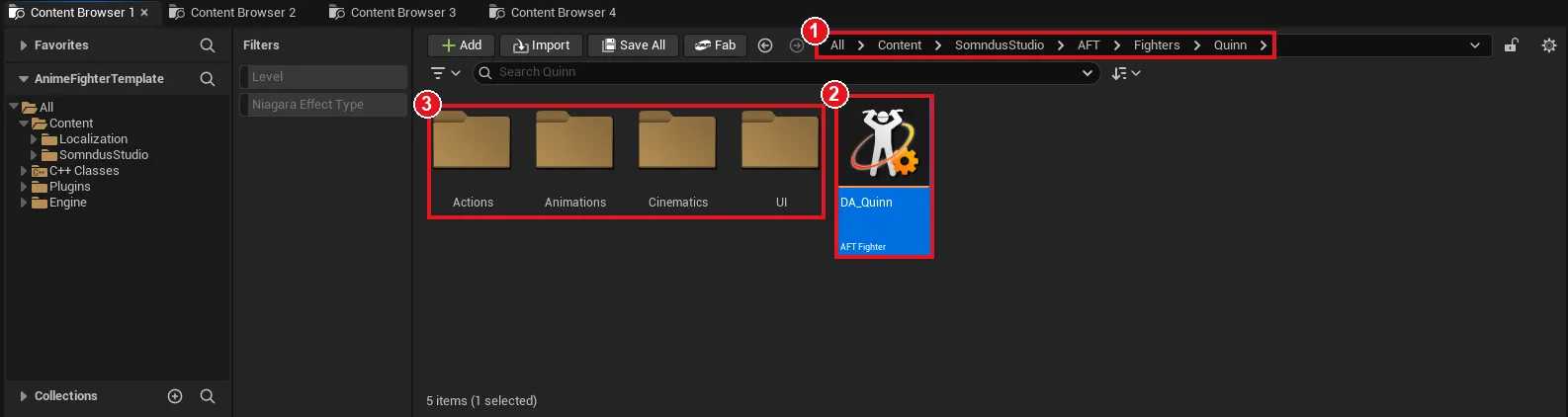
/Game/SomndusStudio/AFT/Fighters/QuinnDA_Quinn, the AFT Fighter data assetActions(one asset per action),Animations,Cinematics(intro / victory Level Sequences) andUI(fighter art)
Configuration
The project configuration that makes it work is in Config/:
DefaultGame.ini: AFT Core and AFT Game settings, Asset Manager primary asset types (AFTFighter,AFTStage,AFTRules,AFTGameMode,AFTUIPolicy), CommonUI / CommonInput settings.DefaultEngine.ini: game default mapMap_AFT_FrontEnd, editor startup mapMap_AFT_Training, global default game modeAFTBattleGameMode.
Every value is described in Project Settings.