Project Settings
AFT has two settings pages in Edit > Project Settings > Plugins: AFT Core (UAFTCoreSettings) and AFT Game
(UAFTGameSettings). Both are saved in Config/DefaultGame.ini.
AFT Core
[/Script/AFTCore.AFTCoreSettings]
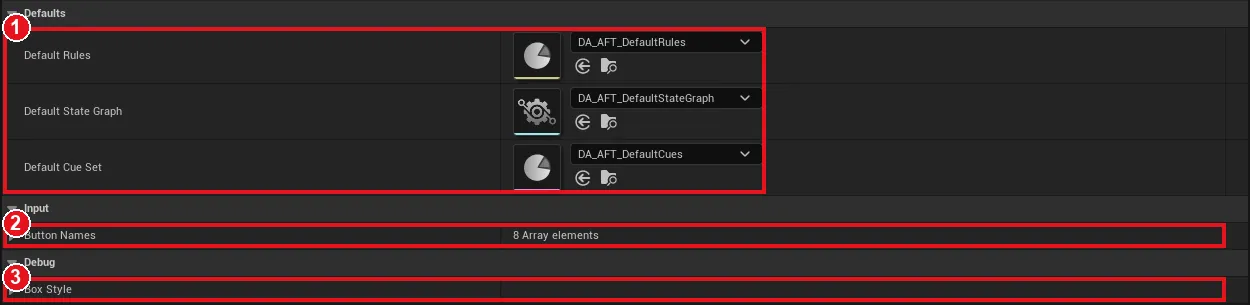
- Defaults: rules, state graph and cue set of the template
- Button Names (8 entries, A to H)
- Box Style
| Category | Setting | Description |
|---|---|---|
| Defaults | DefaultRules | Rules used when a match does not specify any. Template: /AFT/Data/DA_AFT_DefaultRules. |
DefaultStateGraph | State graph of the fighters without their own. Template: /AFT/Data/DA_AFT_DefaultStateGraph. | |
DefaultCueSet | Root fallback of every fighter cue set. Template: /Game/SomndusStudio/AFT/Data/DA_AFT_DefaultCues. | |
DefaultCpuProfile | CPU profile of the fighters without their own. Empty (template): tactics generated from each fighter's move list. | |
| Input | ButtonNames | In-game names of the 8 buttons A to H. Default: LP, MP, HP, LK, MK, HK, Tag, Assist (six attack buttons, see Buttons). |
| Debug | BoxStyle | Collision box colors (hurtbox, hitbox, push box, throw box, invulnerable hurtbox), fill opacities and border thickness, shared by the in-game box viewer and the Fighter Editor. |
AFT Game
[/Script/AFTGame.AFTGameSettings]

- Presentation classes (None = the AFT default classes)
- Input: input bindings asset and keyboard layout (
AZERTY (ZQSD)in the template)
Presentation
| Setting | Description |
|---|---|
DefaultFighterActorClass | Actor that displays the fighters (default AAFTFighterActor). A fighter VisualClass overrides it. |
BattleCameraClass | Battle camera (default AAFTBattleCamera). |
PresentationClass | Cues, projectiles and boxes presentation (default AAFTBattlePresentation). |
HitStopShakeAmplitude | Visual shake of the fighters during hit stop, in cm (3). |
Input
| Setting | Description |
|---|---|
InputBindings | Default key layouts (UAFTInputBindings). None = built-in layouts. |
KeyboardLayout | Layout of the built-in bindings: Qwerty (WASD, default) or Azerty (ZQSD, template). |
UI
| Setting | Description |
|---|---|
UIPolicy | The UI Policy: primary layout, widget class of every screen, UI sounds, settings collection. Template: /AFT/UI/DA_AFT_UIPolicy. |
CharacterSelectPreview | Fighters of the character select: Model3D (3D (real time), default) or StaticImage (Static Image (Full Art)). Override it in a platform Game ini, or live with aft.CharacterSelect.Preview. See 3D fighters or static image. |
CharacterSelectStageClass | Stage spawned by the character select when the menus map has none (None = AAFTCharacterSelectStage). Only with the 3D preview. |
The per-screen class settings below override the policy when they are set (handy to test one screen). Leave them empty to use the policy, or the built-in screens (see Custom UI).
| Setting | Built-in class |
|---|---|
PrimaryLayoutClass | UAFTPrimaryLayout |
TitleScreenClass | UAFTTitleScreen |
MainMenuScreenClass | UAFTMainMenuScreen |
SideSelectScreenClass | UAFTSideSelectScreen |
CharacterSelectScreenClass | UAFTCharacterSelectScreen |
StageSelectScreenClass | UAFTStageSelectScreen |
OnlineLobbyScreenClass | UAFTOnlineLobbyScreen |
BattleHUDClass | UAFTBattleHUD |
TrainingHUDClass | UAFTTrainingHUD (HUD of training matches) |
PauseMenuClass | UAFTPauseMenu |
ResultScreenClass | UAFTResultScreen |
SettingsScreenClass | None: UAFTSettingsScreen when the UI policy has a Settings collection (template), else the Settings entry becomes Button Layout. Set it only to replace the settings screen. |
Flow
| Setting | Description |
|---|---|
FrontEndMap | Map with the menus. Template: Map_AFT_FrontEnd. |
DefaultBattleMap | Battle map used when a stage data has no level. Template: Map_AFT_Training. |
QuickBattleFighters | Fallback fighters when a battle map is played directly without match setup. Template: DA_Quinn. |
Online
| Setting | Default | Description |
|---|---|---|
LobbyBackend | LAN | Backend of Host Match / Find Match and HostDefault / FindLobbiesDefault: Local, LAN or Platform, see Online Backends. |
GamePort | 7000 | UDP port of the rollback sessions (direct IP / LAN). |
PlatformSocketSubsystem | None | Socket subsystem of the Platform backend (EOS, SteamSockets...). |
OnlineFrameDelay | 2 | Input delay of online matches (0 to 8). |
Template configuration
The DefaultGame.ini of the template:
[/Script/AFTCore.AFTCoreSettings]
DefaultRules=/AFT/Data/DA_AFT_DefaultRules.DA_AFT_DefaultRules
DefaultStateGraph=/AFT/Data/DA_AFT_DefaultStateGraph.DA_AFT_DefaultStateGraph
DefaultCueSet=/Game/SomndusStudio/AFT/Data/DA_AFT_DefaultCues.DA_AFT_DefaultCues

[/Script/AFTGame.AFTGameSettings]
; The settings screen comes from the Settings collection of the UI policy (no SettingsScreenClass).
UIPolicy=/AFT/UI/DA_AFT_UIPolicy.DA_AFT_UIPolicy
; Built-in keyboard bindings: Azerty = ZQSD (French keyboards), Qwerty = WASD.
KeyboardLayout=Azerty
+QuickBattleFighters=/Game/SomndusStudio/AFT/Fighters/Quinn/DA_Quinn.DA_Quinn
FrontEndMap=/Game/SomndusStudio/AFT/Maps/Map_AFT_FrontEnd.Map_AFT_FrontEnd
DefaultBattleMap=/Game/SomndusStudio/AFT/Maps/Map_AFT_Training.Map_AFT_Training
LobbyBackend=LAN
GamePort=7000
OnlineFrameDelay=2
And in DefaultEngine.ini:
[/Script/EngineSettings.GameMapsSettings]
GameDefaultMap=/Game/SomndusStudio/AFT/Maps/Map_AFT_FrontEnd.Map_AFT_FrontEnd
EditorStartupMap=/Game/SomndusStudio/AFT/Maps/Map_AFT_Training.Map_AFT_Training
GlobalDefaultGameMode=/Script/AFTGame.AFTBattleGameMode
The Asset Manager types are listed in Set Up Your Own Project.
Reading the settings in C++
#include "Data/AFTCoreSettings.h"
#include "AFTGameSettings.h"

const UAFTCoreSettings* Core = UAFTCoreSettings::Get();
const FText Notation = Core->FormatNotation(TEXT("236A")); // "236P" with the default button names

const UAFTGameSettings* Game = UAFTGameSettings::Get();
const int32 Port = Game->GamePort;