Online Backends
Online flow
UAFTOnlineSubsystem (game instance subsystem) runs the lobby and the handshake, then hands the ready transport to the battle:
- Host: opens the UDP socket and advertises a lobby (session) with its address and protocol version.
- Find / Join: lists the lobbies (or joins an address directly), connects, and exchanges a reliable handshake on the same socket: protocol version, fighter selection, stage, seed.
- Both peers load the battle map with the same
FAFTMatchConfig. The rollback session starts on the socket of the handshake, so no other port and no extra NAT punch is needed.
The Online game mode opens the online lobby screen (UAFTOnlineLobbyScreen), which drives these steps: pick your fighter,
then Host Match or Find Match. Both use the project backend (AFT Game > Online > Lobby Backend, LAN by default). Found
lobbies are listed with their ping.
In development builds, DEV: entries force a backend (LAN, online, local test) or connect directly to an IP address. They do not
exist in Shipping builds: console certification does not allow debug or IP entry options in the final game.
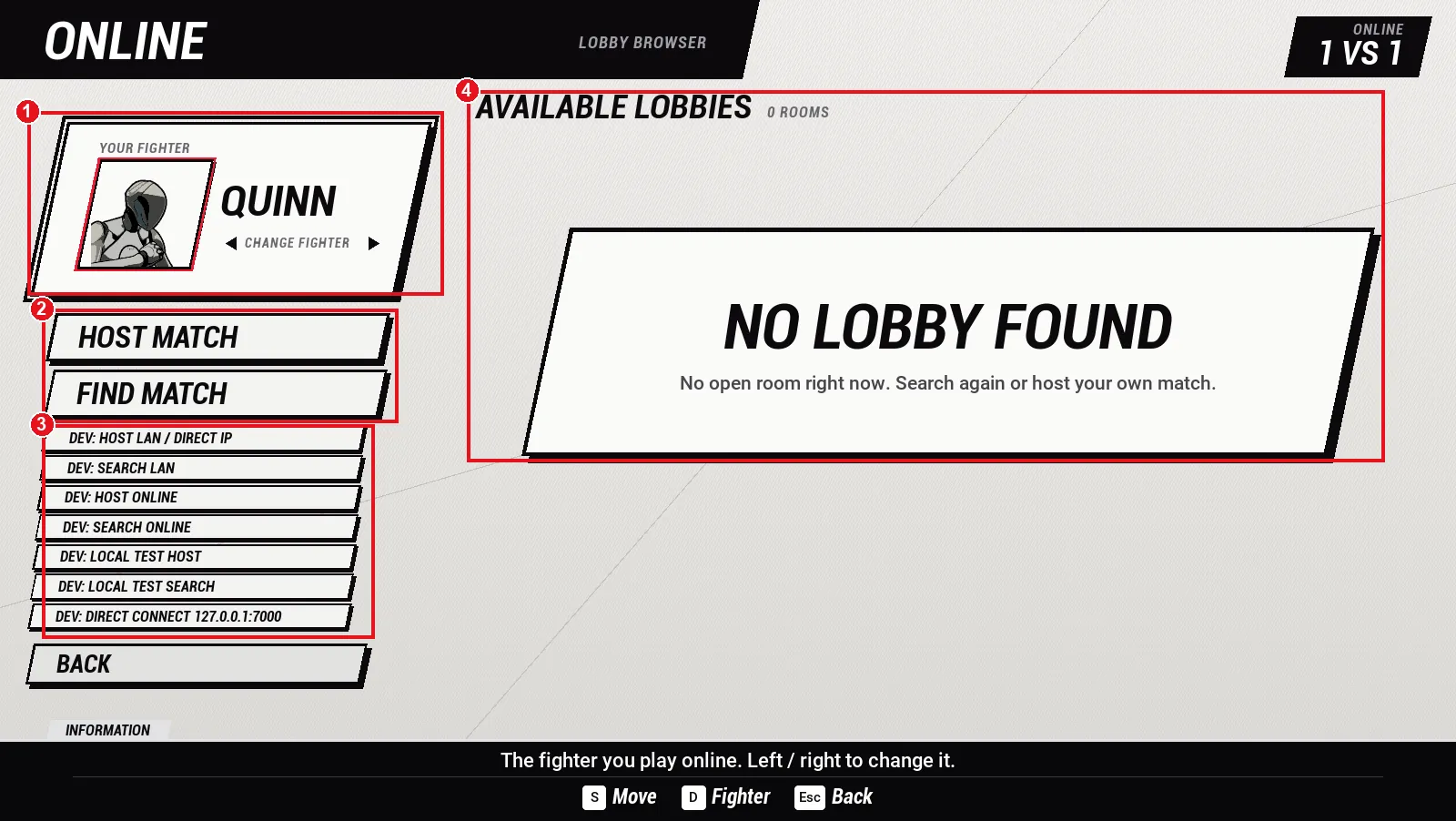
- Your fighter (left / right to change it)
- Host Match / Find Match: the project backend (AFT Game > Online > Lobby Backend)
DEV:entries, development builds only: forced LAN, online and local test backends, direct connect to an address- The lobbies found, with their ping (here none yet)
Backends
Project Settings > AFT Game > Online > Lobby Backend (EAFTLobbyBackend) is the backend of Host Match / Find Match and of
HostDefault / FindLobbiesDefault. Host(Backend) / FindLobbies(Backend) force another one.
| Backend | Lobbies | Transport | Configuration |
|---|---|---|---|
Local | In process | Loopback | None. PIE with 2 clients, automated tests. |
LAN (default) | OnlineSubsystem Null LAN sessions | Platform UDP sockets on Game Port (7000, +16 retries) | [OnlineSubsystem] DefaultPlatformService=Null |
Platform | The default OnlineSubsystem sessions / lobbies (EOS, Steam, console OnlineSubsystems) | Its P2P socket subsystem | Set Platform Socket Subsystem (EOS, SteamSockets...), or leave it empty for plain UDP |
| Setting (AFT Game > Online) | Default | Description |
|---|---|---|
LobbyBackend | LAN | Backend of Host Match / Find Match (Local, LAN or Platform). |
GamePort | 7000 | UDP port of the rollback sessions (direct IP / LAN). |
PlatformSocketSubsystem | None | Socket subsystem of the Platform backend (EOS, SteamSockets... None = platform default). |
OnlineFrameDelay | 2 | Default input delay of online matches (0 to 8). |
Epic Online Services (EOS)
- Enable and configure the OnlineSubsystemEOS plugin of the engine (product, sandbox, deployment, client credentials) and set it as the default platform service.
- Set AFT Game > Online > Lobby Backend to Platform and Platform Socket Subsystem to EOS.
- Log the player in before hosting or joining (CommonUser, or your own login flow).
With the EOS socket subsystem, peers are addressed by product user id (EOS:<PUID>:AFT:<port>). Any OnlineSubsystem that
implements sessions works the same way (Steam with SteamSockets, console OnlineSubsystems).
Direct IP
FAFTNetConfig (in the match config) holds the low level settings: RemoteAddress (format of the socket subsystem, for example
192.168.1.20:7000), LocalTeam, LocalPort, SocketSubsystem, BindAddress (non IP socket subsystems), FrameDelay and the
Spectators addresses allowed to connect.
Online subsystem API
Use UAFTOnlineSubsystem directly to build your own lobby UI (all functions are Blueprint callable):
| Function / event | Description |
|---|---|
SetLocalSelection(Fighter, Palette), SetHostStage(Stage) | Local fighter and the stage chosen by the host. |
HostDefault, FindLobbiesDefault | Open / search lobbies with the project backend (Lobby Backend). Results in GetFoundLobbies and OnLobbiesFound. |
Host(Backend), FindLobbies(Backend) | Same with a forced backend. |
JoinLobby(Lobby) | Join a lobby found by a search. |
JoinDirect(Address) | Join an address. |
Cancel | Leave / stop. |
GetState | Idle, Hosting, Searching, Joining, Handshake, Starting, Error. |
GetLocalAddress, GetStatusText | Address to share for direct IP, status line for the UI. |
OnStateChanged, OnLobbiesFound, OnError | Events for your UI. |
During the match, UAFTBattleSubsystem::OnSessionStatusChanged reports interruptions and disconnections.