State Graph Editor
The neutral and movement logic of a fighter (stand, crouch, walk, jump, dash, air dash...) is an AFT State Graph asset
(UAFTStateGraph). One graph can be shared by the whole roster (Project Settings > AFT Core > Default State Graph,
DA_AFT_DefaultStateGraph in the template) or a fighter can use its own (StateGraph of the fighter).
Attacks, specials and supers do not go through the graph: they are commands of the fighter and cancel rules of the actions. Command actions and hit reactions leave the graph; when they end, the fighter re-enters it through the Entry state.
The editor opens with the whole graph in view. Transitions are straight arrows with a marker and a short label of their conditions; aliases (purple) keep the graph readable:
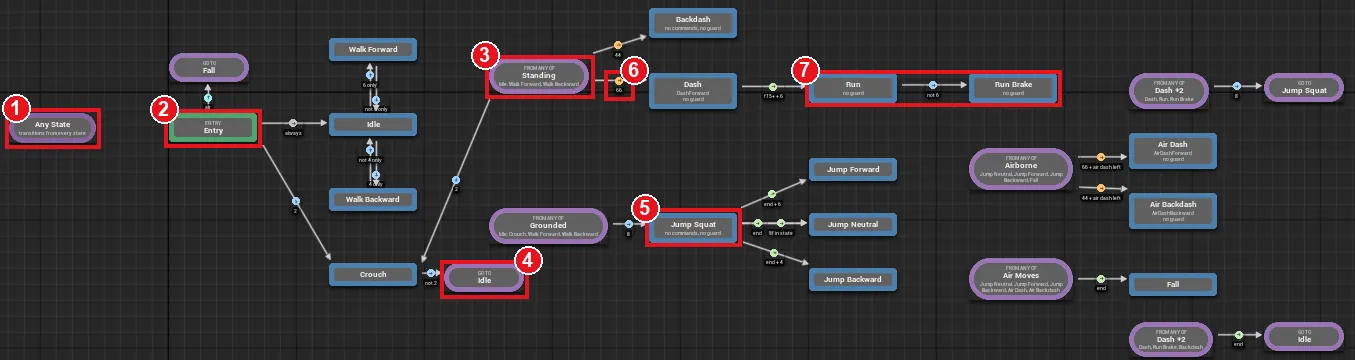
- Any State: transitions checked from every state
- The Entry router (green)
- A FROM ANY OF alias (Standing: Idle, Walk Forward, Walk Backward): its transitions leave each of these states
- A GO TO alias (Idle): a shortcut to a state, instead of a long arrow across the graph
- A state (Jump Squat, blue) with its flags (no commands, no guard)
- A transition marker and its short label (66: the dash command)
- The run: Run while forward is held after the dash, then Run Brake when it is released (see Dash and run). The two Dash +2 aliases on the right draw the shared transitions once: Dash, Run and Run Brake jump on Up; Dash, Run Brake and Backdash return to Idle when they end.
Nodes
| Node | Description |
|---|---|
| State | Plays an action while active: an action slot (ActionSlot, resolved on each fighter, for shared graphs) or an explicit action (ActionOverride, for fighter specific graphs). Flags: bAllowCommands (command actions may start from this state) and bCanGuard (the fighter blocks when holding back). |
| Router | No action: branches immediately to the first transition that passes. The Entry router chooses the state when the fighter returns to neutral. |
| Any State | Its transitions are checked from every state, before the transitions of the current state. |
| Alias | Stands for one or more states, checked in its details. FROM ANY OF (several states): the transitions leaving the alias leave each checked state, so a transition shared by several states is drawn once. GO TO (one state): transitions may also arrive on it, as a shortcut to that state. Aliases only exist in the editor: the runtime data is the same as with plain transitions. |
| Transition | An edge between two states, with a Priority (higher first) and a list of conditions. All the conditions must pass (AND); several transitions express an OR. The highest priority transition that passes wins. |
Conditions
Every condition can be inverted (bInvert).
| Condition | Description |
|---|---|
| Input Direction | Holding a direction relative to the facing (numpad), Exact or Contains (Down contains 1, 2 and 3). |
| Input Button | Buttons pressed, released or held. |
| Input Command | A motion command (66 dash, 44 backdash, 28 super jump...). Consumes the input when it passes. |
| Airborne | In the air (invert for grounded). |
| Action Finished | The current action reached its last frame (never true for looping actions). |
| Action Frame | Current action frame >= MinFrame. |
| Falling | Moving down (invert for rising). |
| Opponent Distance | Horizontal distance to the opponent compared to a value. |
| Meter | Team meter >= Minimum. |
| Air Option Available | Air jumps or air dashes left (fighter stats). |
| Random Chance | Deterministic random (simulation RNG), in percent. |
| Time In State | Frames spent in the current state >= MinFrames. |
| Blueprint Condition | A condition made in Blueprint: pick its class, then set its variables. See Custom conditions (Blueprint). |
Editing
- Right click in the graph to add a State, a Router or an Alias.
- Drag from the edge of a box to another box to create a transition, then click its marker to edit its priority and conditions in Details. Transitions can only arrive on an alias of exactly one state.
- Select an alias to check its states in Details; double click an alias to jump to its state.
- Deleting a state also deletes its transitions.
- Auto Arrange rebuilds a readable layout: transitions shared by several states are grouped on a FROM ANY OF alias, and arrows
that would cross the graph go to a GO TO alias next to their source. The behavior does not change, and Undo restores the previous
layout. From Python:
unreal.AFTEditorLibrary.arrange_state_graph(graph). - The runtime data is regenerated on every change. Compile forces it, Reset To Default replaces the graph by the standard fighter neutral layer.

- The states of an alias (here Standing: Idle, Walk Backward, Walk Forward)
- Its name
The default graph
Reset To Default (and UAFTEditorLibrary::CreateDefaultStateGraph, or ResetStateGraphToDefault on an existing graph) builds
the standard graph: the Entry router and 15 states (Idle, Crouch, Walk Forward / Backward, Jump Squat, the three jumps, Fall,
Dash, Run, Run Brake, Backdash, Air Dash, Air Backdash).
| From | To | Priority | Conditions |
|---|---|---|---|
| Entry | Fall | 100 | Airborne |
| Entry | Crouch | 50 | Down |
| Entry | Idle | 0 | |
| Grounded states | Jump Squat | 100 | Up |
| Standing states | Dash / Backdash | 90 | Command 66 / 44 |
| Standing states | Crouch | 50 | Down |
| Idle | Walk Forward / Backward | 10 | Exactly forward / back |
| Crouch, walks | Idle | 0 | Direction released |
| Jump Squat | Jump Forward / Backward / Neutral | 20 / 20 / 10 | Action finished (+ direction) |
| Jumps, Fall | Air Dash / Air Backdash | 50 | Command 66 / 44 and an air dash left |
| Jumps, air dashes | Fall | 0 | Action finished |
| Dash, Run, Run Brake | Jump Squat | 50 | Up (dash jump, run jump) |
| Dash | Run | 20 | Action frame 14 or more, and holding forward |
| Run | Run Brake | 10 | Forward released |
| Dash, Run Brake, Backdash | Idle | 0 | Action finished |
Dash and run
- Tap
66: the whole forward dash plays, then the fighter returns to Idle. - Hold forward after
66: from frame 14 of the dash (the end of the burst), the fighter runs (AFT.Action.Run, a looping action) as long as forward is held, then brakes (AFT.Action.RunBrake) when forward is released. - Up during the dash, the run or the brake jumps.
44is always a backdash: there is no backward run.
Dash, Run, Run Brake and the air dashes allow commands (an attack cancels the run) but not guard. Backdash and Jump Squat allow neither. An attack button during the dash or the run starts a dash attack, and during an air dash an air dash attack: these commands only start from those actions (see Attacks out of a dash). During the run brake, the buttons give the usual normals.
The default graph sends the fighter to the Run and Run Brake states, so a fighter needs the AFT.Action.Run and
AFT.Action.RunBrake slots: a missing slot falls back to Idle. Add them to an existing fighter, without touching its other
actions, with GenerateMissingActions. A fighter graph made
from an older default graph gets the run with Reset To Default (your changes to that graph are lost).
Custom conditions (Blueprint)
A new condition can be made in Blueprint, without C++:
- Content Browser > Add > Blueprint Class, parent class AFT State Condition Blueprint.
- Add the settings of the condition as variables (integers, booleans,
AFT Fixedvalues...) and tick Instance Editable: each condition placed on a transition gets its own values. - Override the Evaluate function and return whether the transition may fire. Its Condition input is the fighter whose transition is tested: plug it into the AFT State Condition functions.
- In the State Graph editor, select a transition, add a condition of type Blueprint Condition, pick your class in its Condition details and set its variables. The transition marker shows the class name (override Get Editor Label for another text).
The template has an example, /AFT/Data/Conditions/BP_AFT_Condition_LowHealth: Evaluate returns whether Get Health Percent is at most
its Health Percent variable (30 by default), for example to switch to a low health stance or idle.
| Functions (AFT State Condition category) | |
|---|---|
| Action and state | Get Action Frame, Is Action Finished, Get Frames In State |
| Input | Is Direction Held (numpad direction relative to the facing, Contains or Exact), Is Button Input (pressed, held or released) |
| Situation | Is Airborne, Is Falling, Get Facing, Get Position, Get Velocity (cm per frame, X forward), Get Distance To Opponent (cm), Get Air Jumps Left, Get Air Dashes Left |
| Health and meter | Get Health, Get Max Health, Get Health Percent, Get Meter |
| Random | Random Int, Random Chance (the simulation random) |
For the math, use integers and the deterministic AFT Fixed nodes (+ - * /, Fixed From Int, < > ==...), see
Custom frame events (Blueprint).
Evaluate runs every frame the transition is tested, and again on every frame the simulation plays again (rollback, sync test): from the same state, it must give the same result.
- Integers and AFT Fixed values only, no Float math nodes; Random Int and Random Chance only, never the Blueprint Random nodes.
- Evaluate is a const function: it reads the fighter, it changes nothing (not even its own variables).
- No world, actor or timer: the condition runs inside the simulation.
- A condition without class never passes, and the graph reports it when it is saved.
- A Blueprint condition costs more than a C++ one: a condition of the shared default graph is tested for every fighter on every frame, keep it short or move it to C++.
Custom conditions (C++)
Conditions are FInstancedStructs: derive a USTRUCT from FAFTStateCondition and it appears in the condition list
automatically. Like frame events, conditions must be deterministic (see Writing Deterministic Code).