Character Render Studio
The AFT Character Render Studio is an editor tool to render a fighter to PNG at any resolution (4K by default): character select and HUD images, art for your store page or marketplace, illustrations in any pose. One button also renders the Icon, Portrait and Full Art of the fighter (the images the game UI shows) and assigns them to the fighter data asset.
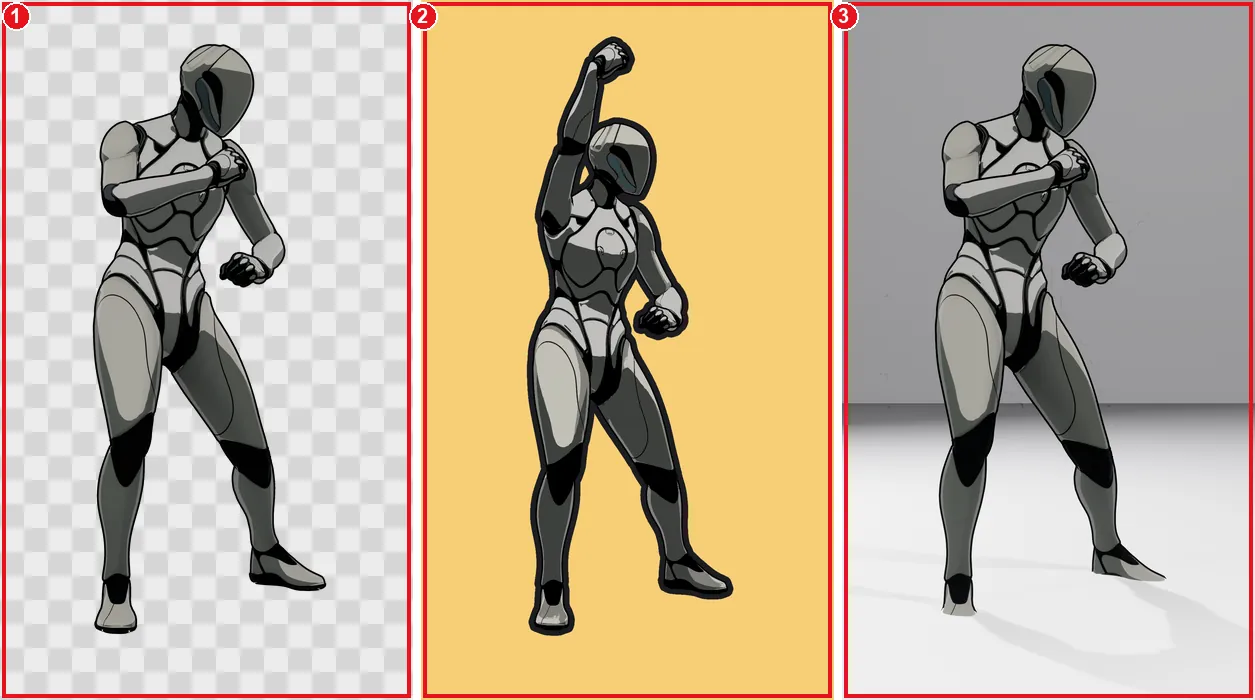
- Transparent background (PNG with alpha), Game look, full body
- Color background, Manga look, in the win pose (
A_Win_Pose) - Scene background: the backdrop and floor of the studio, with their shadows
Open the studio
Open Map_AFT_CharRender (/Game/SomndusStudio/AFT/Maps). It contains:
- the AFT Character Render Studio actor: select it, everything is in its Details panel;
- a Level Sequence actor, PoseSequence, that plays
Maps/CharRender/LS_CharRender_Pose(see Pose with the Sequencer).
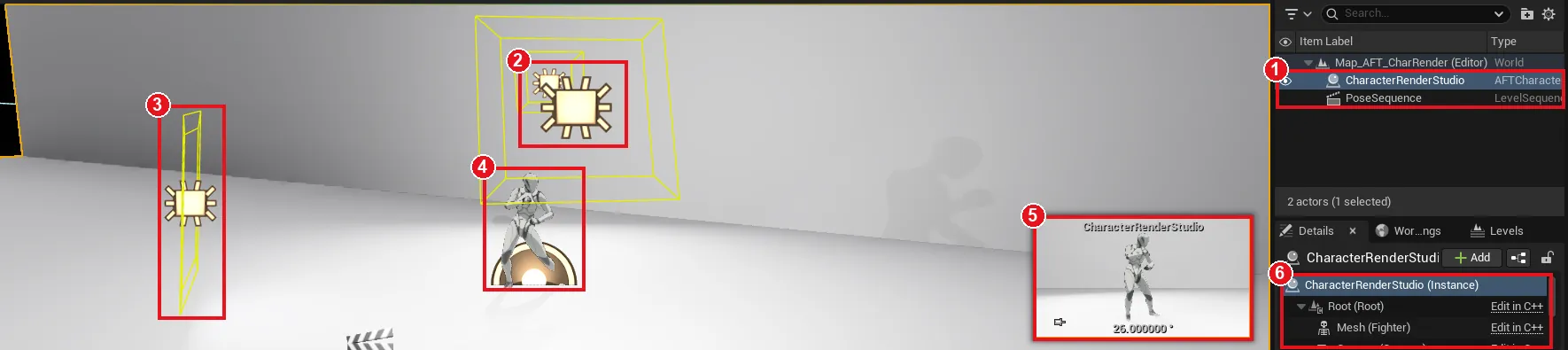
- The CharacterRenderStudio and PoseSequence actors in the Outliner
- Key light, with the rim light behind it
- Fill light
- The fighter (
Fightercomponent), on the studio floor in front of the backdrop - Preview of the studio camera, the view the renders are taken from (field of view 26°)
- The components of the studio in the Details panel, above its properties
The studio is a single actor: you can also drop it in another map (Place Actors, search "AFT Character Render Studio"). It is best in a map of its own, because its post process is unbound: it sets the exposure of the whole level.
| Component | Role |
|---|---|
Fighter | The skeletal mesh of the fighter, with its palette and its pose. |
Camera, Capture | The framing camera and the scene capture attached to it: the renders are taken from this camera. Its aspect ratio follows the output size, so piloting it shows the final framing. |
KeyLight, FillLight, RimLight | Three point lighting with rect lights: a warm key light in front, a cool fill light on the other side, a rim light behind. |
Ambient | Sky light (neutral gray cubemap). |
Backdrop, Floor | The backdrop and the floor, tinted by BackdropColor. Seen only in Scene renders. |
PostProcess | Manual exposure (Exposure), no motion blur, no vignette: the viewport looks like the renders. |
Select a component in the Details panel to change it, for example the intensity or the color of a light.
Render an image
- Fighter: pick the fighter data asset, its
Paletteand itsTurn. - Pose: an action of the fighter at a frame, an animation at a time, or a Level Sequence.
- Camera: a
Shot(FullBody,Bust,Face) frames the fighter automatically;Customkeeps the camera where you place it. - Output: size, background and look.
- Click Render Image. The PNG is written to
Saved/Renders/, and a notification offers to Open the renders folder.
Every change of a property applies the fighter again (mesh, palette, pose), and frames the shot again when the change affects the
framing (fighter, turn, pose, shot, margin, camera angles, field of view, size), unless Shot is Custom.
Fighter
| Property | Description |
|---|---|
Fighter | The fighter data asset. The studio uses its mesh, its mesh offset and its palettes. |
Palette | Color: palette index of the fighter. |
Turn | Turn of the fighter, in degrees. 0 is the in-game facing: toward screen right, as the battle camera sees it. |
Pose
| Property | Description |
|---|---|
PoseSource | Action, Animation or Level Sequence / Manual. |
PoseAction, PoseFrame | Action: an action of the fighter at a frame (0 based: the Fighter Editor timeline frame minus 1). Empty: the Idle slot of the fighter. Use a win pose, an attack on its active frame, a taunt... |
PoseAnimation, PoseTime | Animation: any animation of the skeleton, at a time in seconds. |
In the Action and Animation modes, the studio applies its pose again on every property change. In Level Sequence / Manual
mode, it does not touch the pose of the mesh anymore.
Camera
| Property | Default | Description |
|---|---|---|
Shot | FullBody | FullBody, Bust (head, shoulders and chest), Face (head, neck and top of the shoulders): automatic framing. Custom: the camera stays where you put it (move the Camera component, or pilot it). |
ShotMargin | 0.08 | Extra space around the framed part, as a fraction of its size. |
CameraYaw | 0 | Orbit of the camera around the fighter, in degrees. 0 is the side of the battle camera. |
CameraPitch | 4 | Height angle of the camera, in degrees. Above 0: seen from above. |
FieldOfView | 26 | Horizontal field of view, in degrees. A narrow one gives a flatter, portrait lens look. |
Exposure | 0 | Exposure compensation (EV) of the viewport and of the renders. |
Frame Shot places the camera for the current Shot at the output aspect ratio (it is also done automatically, see above).
Output
| Property | Default | Description |
|---|---|---|
Width, Height | 3840 x 2160 | Size of the PNG (16 to 8192 pixels). |
Supersample | 2 | The image is rendered at this multiple of its size (1 to 4), then filtered down: clean anti aliasing. Lowered automatically when the render would exceed 16384 pixels. |
Background | Transparent | Transparent: the fighter alone, PNG with alpha. Color: the fighter over BackgroundColor. Scene: everything the camera sees (backdrop, floor, other actors of the map). |
Style | Game | Game: the in-game look. Manga: posterized tones and an ink outline around the silhouette. |
PosterizeLevels | 5 | Manga: number of tones. The tones posterize the luminance and keep the hue, so the colors do not band. 0: no posterization. |
InkOutline | 8 | Manga: width of the ink outline, in pixels of a 1080 pixels tall image (scaled with the image height). 0: no outline. |
InkColor | Near black | Manga: color of the ink outline. |
OutputFolder | Renders | Folder of the PNG files, relative to the Saved folder of the project, or absolute. |
Render Image names the file <FighterId>_<Shot>_<date>_<time>.png. Transparent and Color render the fighter alone:
the atmosphere, the fog and the clouds of the map are off, and the Manga look applies only to them. Only Scene keeps the
scenery.
Automatic framing
The FullBody, Bust and Face shots follow the real outline of the fighter in its pose, not guessed proportions:
- The studio renders the fighter alone at low resolution (360 pixels tall): the alpha of this silhouette gives the box of the body.
- The top of the head is the first covered row above the
headbone, in the columns around it: a raised fist next to the head is not taken for the head. The center of the skull is measured just under this top. FaceandBustare framed from the top of the head. This works with hair, a helmet, a hat or a raised arm.
ShotMargin (or the Margin of a fighter image) adds space around the framed part. The Face and Bust shots look for a bone
named head (Unreal mannequin naming); without one, the head is estimated at the top of the skeleton.
Pose with the Sequencer
For a pose made by hand (animation layers, Control Rig, a pose between two animations):
- Set
PoseSourceto Level Sequence / Manual: the studio stops applying its own pose. - Open
LS_CharRender_Pose(double click the PoseSequence actor's sequence, or the asset inMaps/CharRender). It has 50 frames (0 to 49) and a skeletal animation track,A_Win_Pose, on CharacterRenderStudio > Fighter. - Change the tracks of the
Fighterbinding (other animations, Control Rig, additive layers) and scrub to the frame you want. - Click Render Image: the studio renders the pose shown in the viewport.
Fighter images
Update Fighter Images renders the three UI images of the fighter, always with a transparent background, in the
FighterImagesStyle look (Manga by default, the look of the template UI):
| Setting | Shot | Size | Margin | Used by the UI for |
|---|---|---|---|---|
IconImage | Face | 256 x 256 | 0.18 | Roster cells and picks, HUD, online fighter card, result score card |
PortraitImage | Bust | 512 x 512 | 0.04 | Fallback when the Icon or the Full Art is missing |
FullArtImage | FullBody | 533 x 1223 | 0.03 | Title, main menu, result, character select with the static image |
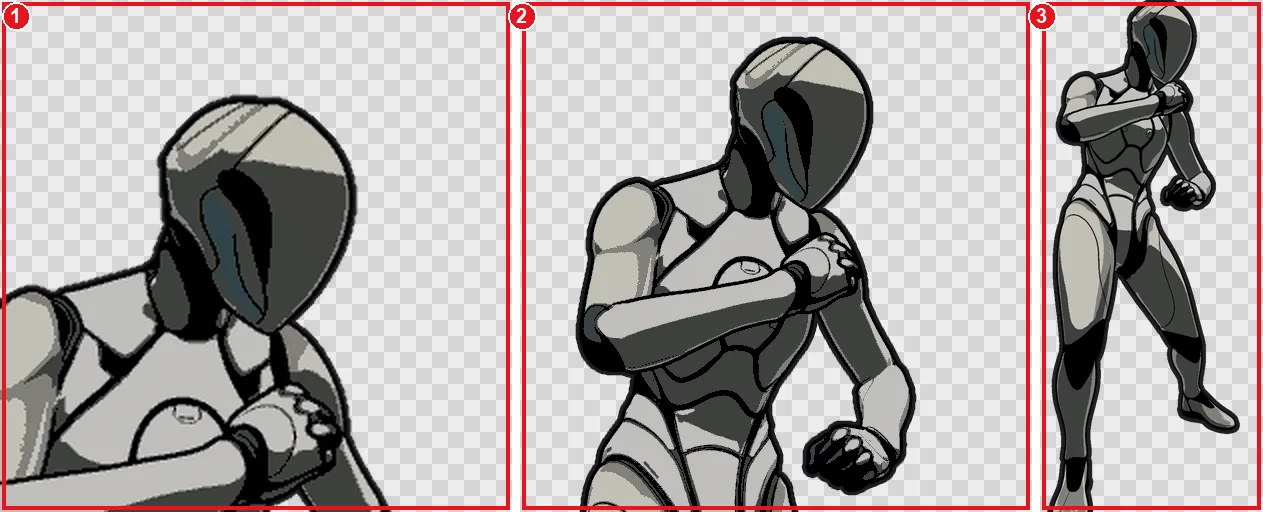
T_Quinn_Icon(Face)T_Quinn_Portrait(Bust)T_Quinn_FullArt(Full Body)
For each image:
- the PNG is written to
Saved/Renders/<Name>/T_<Name>_<Icon|Portrait|FullArt>.png(<Name>is theFighterId, or the asset name withoutDA_). It stays there as the source file of the texture, for a reimport; - when the fighter already has a texture for this image in the
UIfolder next to its data asset, that texture is updated in place (same asset, same path); - otherwise the studio creates
T_<Name>_<Kind>in thatUIfolder and assigns it toIcon,PortraitorFullArt. A texture elsewhere is left as it is: a fighter data asset copied from another fighter (like Manny from Quinn) still points to the images of that fighter, and gets its own. The fighter data asset is saved only when it changes.
The textures are saved right away, as UI textures (UI texture group, sRGB, no mipmaps). The camera gets back to its place
afterwards. The Icon, Portrait and FullArt of Quinn (Fighters/Quinn/UI) and Manny (Fighters/Manny/UI) were made this
way: see them in the menus.
Scripts
The studio functions are Blueprint callable, so they work from Python (unreal.AFTCharacterRenderStudio, snake_case names) and
from Editor Utility Widgets:
| Function | Description |
|---|---|
ApplyFighter() | Applies the fighter, the palette and the pose (also done on every property change). |
FrameShot() | Places the camera for Shot at the output aspect ratio. |
RenderToFile(Shot, Width, Height, FileName) | Renders with the current ShotMargin, Style and Background to a PNG (FileName absolute, or relative to OutputFolder; .png added when there is no extension). Returns the written path, empty on failure. The camera keeps the framing of the shot. |
RenderFighterImages() | Update Fighter Images. Returns false when nothing could be rendered or saved. |
GetLastCoverage() | Fraction of the last image covered by the fighter (checks). |
In C++, RenderPixels(Shot, Margin, Width, Height, Style, Background, OutPixels) returns the pixels (BGRA, straight alpha) without
writing a file, and GetMesh() the fighter mesh component.
Render the open studio map in 4K, then the fighter images:
import unreal

actors = unreal.get_editor_subsystem(unreal.EditorActorSubsystem).get_all_level_actors()
studio = next(a for a in actors if isinstance(a, unreal.AFTCharacterRenderStudio))

studio.set_editor_property("fighter", unreal.EditorAssetLibrary.load_asset("/Game/Fighters/Hero/DA_Hero"))
studio.set_editor_property("palette", 1)
studio.set_editor_property("background", unreal.AFTRenderBackground.TRANSPARENT)
studio.set_editor_property("style", unreal.AFTRenderStyle.MANGA)
studio.apply_fighter()

path = studio.render_to_file(unreal.AFTRenderShot.FULL_BODY, 3840, 2160, "Hero_FullBody_4K")
print(path, studio.get_last_coverage())
studio.render_fighter_images()
The renders need a GPU: run scripts in the editor, not in a commandlet or with -nullrhi.
Troubleshooting
| Problem | Cause and fix |
|---|---|
| Empty renders | The studio (or a Blueprint child of it) must not be an editor only actor (Is Editor Only Actor): the primitives of editor only actors are hidden from every game view, scene captures included. |
| The Sequencer pose is replaced | Set PoseSource to Level Sequence / Manual: in the other modes, the studio applies its own pose on every property change. |
| No sky, fog or clouds | Transparent and Color render the fighter alone. Use Scene to keep the scenery. |
| No Manga look | The Manga look applies to the Transparent and Color backgrounds only. |
| "Render failed" | See the Output Log (LogAFTRenderStudio). The studio needs a fighter with a mesh, and rendering enabled. |
The AFT.Visual.CharacterRenderStudio automation test checks the studio of Map_AFT_CharRender, see
Debugging and Tests.