Hits and Boxes
Boxes
Every collision in AFT is an axis aligned rectangle in the fighting plane, in centimeters, relative to the fighter origin
(feet on the ground): X is forward (mirrored automatically when the fighter faces left), Y is up. A box is defined by its
center (X, Y) and its Width / Height (FAFTFixedBox, fixed point internally).
| Box | Event | Role | Color |
|---|---|---|---|
| Hitbox | Hitbox | Attack: hits the opponent hurtboxes. References a hit definition by HitIndex. | Red |
| Hurtbox | Hurtbox | Vulnerable area. Default: the fighter DefaultBoxes for the current stance. | Cyan (white when strike invulnerable) |
| Push box | Pushbox | Body collision between fighters and with the walls. Default: the fighter DefaultBoxes. | Yellow |
| Throw box | Throw | Grabs a throwable opponent, ignores guard. | Magenta |
Default boxes of a new fighter (DefaultBoxes, center X / center Y / width / height):
| Hurtbox | Push box | |
|---|---|---|
| Stand | 0 / 90 / 60 / 180 | 0 / 80 / 50 / 160 |
| Crouch | 0 / 55 / 70 / 110 | 0 / 50 / 55 / 100 |
| Air | 0 / 80 / 60 / 120 | 0 / 80 / 45 / 110 |
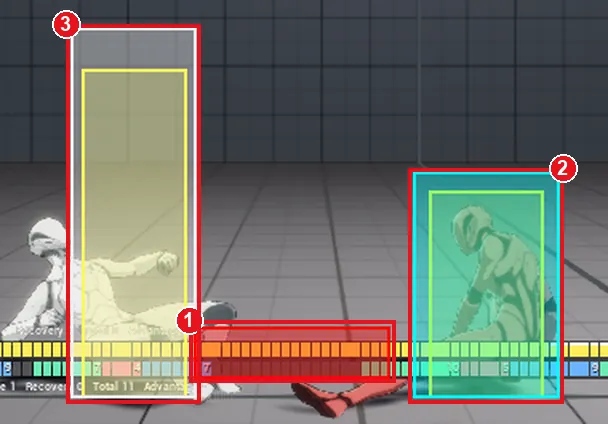
- Hitbox of the attacking Quinn's sweep (red)
- Its hurtbox (cyan) and push box (yellow)
- The knocked down Quinn: strike invulnerable hurtbox (white) and push box (yellow)
The colors, the fill opacity and the border thickness are shared by the Fighter Editor and the in-game box viewer:
Project Settings > AFT Core > Debug > Box Style (Hurtbox, Hitbox, Pushbox, Throwbox, InvulnerableHurtbox, FillOpacity,
PushboxFillOpacity, BorderThickness).
Hit definitions
A hit definition (FAFTHitDefinition, in the Hits array of the action) describes what happens when an attack connects. Hitbox
and throw events reference it by index, so several boxes (or several frames) can share one hit.
| Group | Property | Default | Description |
|---|---|---|---|
HitName | Hit | Label in the editor. | |
AttackLevel | 1 | 0 to 5: default hit stun, block stun, hit stop and reaction from the battle rules table. | |
| Damage | Damage | 300 | Base damage. |
ChipDamage | 0 | Damage on block. | |
ProrationPercent | 90 | Combo scaling applied to the following hits (percent of the current proration). | |
MinimumDamagePercent | 10 | Damage this hit still deals under heavy scaling (percent of Damage). | |
| Guard | GuardType | Mid | Mid (stand or crouch), Low (crouch only), Overhead (stand only), AirUnblockable, Unblockable. |
| Stun | bOverrideStun, HitStun, BlockStun, HitStop | off, 12, 9, 11 | Replace the attack level values. |
| Push | PushbackHit, PushbackBlock | 9, 11 | Horizontal push of the defender (cm per frame, decays). When the defender is cornered, the attacker is pushed instead. |
AirLaunchVelocity | 6, 14 | Velocity given to an airborne or launched defender (X away from the attacker). | |
| Reaction | GroundReaction, AirReaction | Auto | Auto (from the attack level and the stance), StandLight, StandMedium, StandHeavy, Crouch, Air, Launch, KnockdownSoft, KnockdownHard, WallBounce, GroundBounce, Crumple. |
WallReaction | Auto | What the defender does if it reaches a wall: Auto (Bounce with the WallBounce reaction, else None), None (slides down the wall), Bounce (wall bounce), Splat (wall splat). See Walls. | |
CounterHit | ExtraHitStun (4), ExtraHitStop (4), DamagePercent (110), Reaction and WallReaction overrides on counter hit. | ||
bHitsOTG | off | Can hit a knocked down opponent. | |
| Multi hit | HitCount, MultiHitInterval | 1, 4 | Connections on the same target during one action, and frames between two connections. |
| Meter | MeterGainOnHit, MeterGainOnBlock | 30, 15 | Meter gained by the attacker. |
| Presentation | HitCue, BlockCue | Cues spawned at the contact point (spark, sound), see Effects and Sounds. | |
| Hold | HoldActionOnHit | None | Cinematic supers and command grabs: when this hit connects (not blocked, not absorbed by armor, not from a projectile, not a KO), the attacker switches to this action and holds the defender, like a held throw. See Cinematic Supers. |
Attack levels
The battle rules hold one stun table entry per attack level (Guilty Gear like values by default). Edit them in the
battle rules asset (AttackLevels).
| Level | Hit stun | Crouch hit stun | Block stun | Hit stop | Stand reaction |
|---|---|---|---|---|---|
| 0 | 10 | 11 | 9 | 11 | StandLight |
| 1 | 12 | 13 | 11 | 12 | StandLight |
| 2 | 14 | 15 | 13 | 13 | StandMedium |
| 3 | 17 | 18 | 16 | 14 | StandMedium |
| 4 | 19 | 20 | 18 | 15 | StandHeavy |
| 5 | 22 | 23 | 20 | 16 | StandHeavy |
Combat rules
The simulation resolves, every frame: hits, guards, throws and clashes (two hitboxes touching), then armor, counter hits, proration and combo decay.
- Guard: hold back (away from the opponent).
Lowattacks need a crouching guard,Overheada standing guard. - Counter hit: hitting an opponent while a State Flags event raises
CounterHitStateadds the counter hit properties. The wizard places this flag on the startup and active frames of the generated attacks; add it wherever your design needs it. - Proration: each hit multiplies the damage of the following hits by its
ProrationPercent, down to the rulesMinimumProrationPercent(20 by default); each hit keeps at least itsMinimumDamagePercent. - Combo stun decay: the hit stun is reduced by
ComboStunDecayPerSecondframes per second of combo (anti infinite). - Throws: a throw breaks if both players throw within
ThrowTechFrames; throws cannot connect duringThrowProtectionFramesafter a hit or block stun. A throw whose success action holds the opponent deals its damage when it releases it, see Held throws. - Knockdown: the fighter lies
KnockdownFramesframes, then wakes up withWakeUpInvulnerableFramesof invulnerability.
All these values are in the battle rules.