Intro and Victory Cinematics
Fighters can have intro sequences (played before round 1) and victory sequences (played when they win the match). They
are regular Level Sequences, played by UAFTCinematicDirector in sync with the simulation.
Create a sequence
In the Fighter Editor toolbar: Cinematics > New Intro Sequence or New Victory Sequence. It creates,
in <fighter folder>/Cinematics, a Level Sequence (LS_<FighterId>_Intro, LS_<FighterId>_Victory) with:
- a 60 fps display rate and a playback range matching the fighter
Intro/Win Poseaction (or 3 seconds); - a Fighter and an Opponent binding, tagged
Fighter/Opponent: at runtime they are bound to the real fighter actors; - a cine camera with a camera cut and a slow push-in on the fighter;
- the sequence registered in the fighter
IntroSequences/VictorySequences.
The same is available from Python / Blueprint: UAFTEditorLibrary::CreateFighterSequence(Fighter, bVictory, DurationFrames).
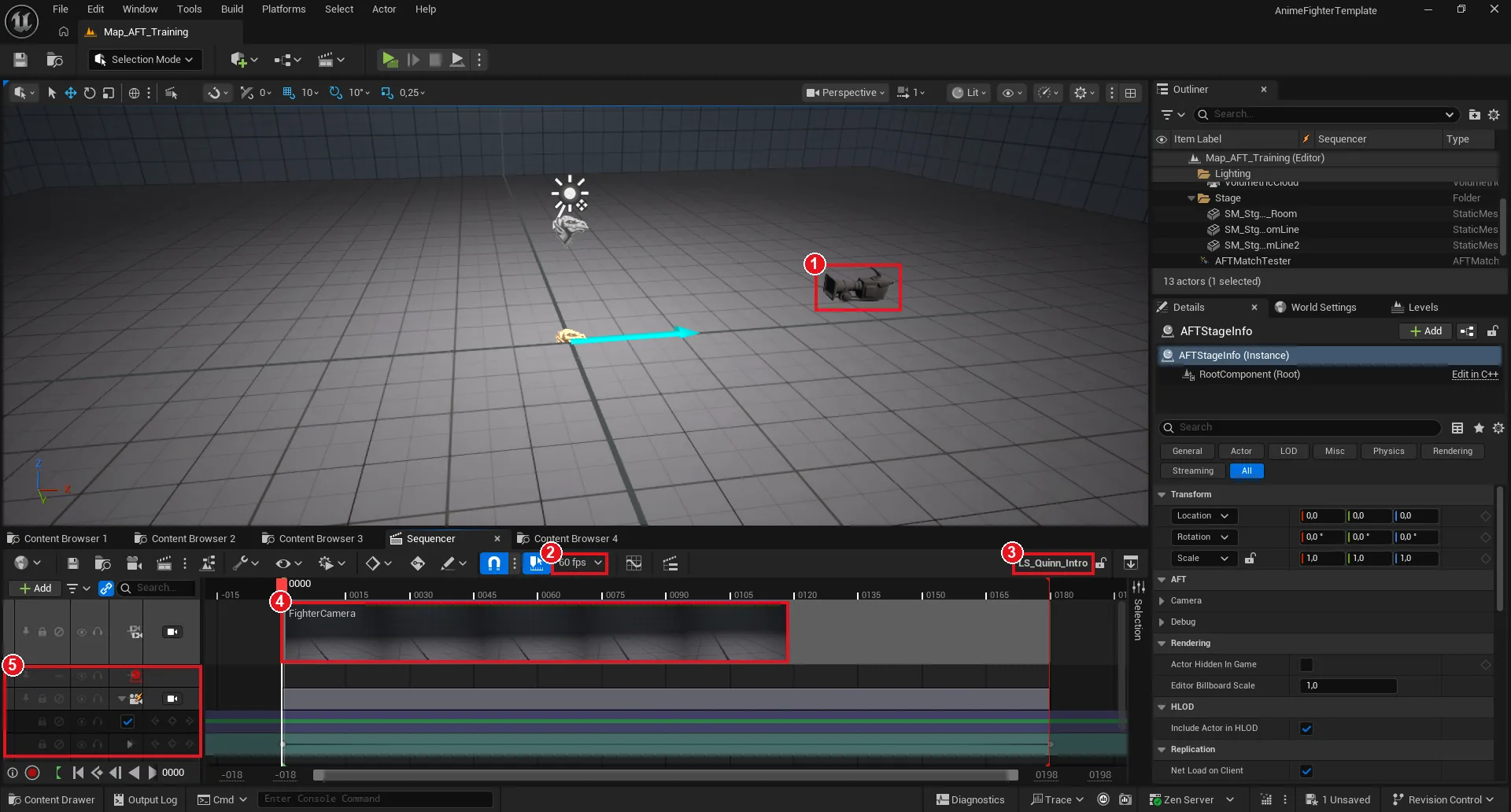
- The cine camera of the sequence
- 60 fps display rate
- The sequence
LS_Quinn_Intro - Camera cut on the fighter camera (push-in)
- Binding tracks of the sequence
Authoring rules
- Space: author around the world origin, the fighter at the origin facing +X. At runtime the sequence is moved onto the fighter and turned with its side (transform origin), so one sequence works for both sides of the screen. To preview with the character, place an AFT Fighter Actor (or the mesh) at the origin and use Assign Actor on the Fighter binding.
- Length: the playback range is the intro length. It is compiled into the simulation, so both online peers play the same
intro for the same time. Without a sequence, the rules
IntroFramesPerSide/VictoryFramesare used. - Skip: the intros are skipped when both players press a button; the skip comes from the simulation inputs, so it is synced online.
- Animation: the character animation comes from the fighter
Intro/Win Poseactions (frame accurate and rollback safe). Use the sequence for the camera work, effects, sounds, props and extra characters. Tracks bound to Fighter (attach, visibility, materials) work too. - Several sequences per fighter: one is picked at random with the match seed, identical on both peers.
At runtime
UAFTCinematicDirector (owned by the battle presentation) plays the sequence of the current phase and keeps it within
MaxDriftFrames (3) of the simulation frame. When the simulation goes past the end of the sequence, the sequence holds its last
frame until the cinematic ends. The box viewer is hidden during a cinematic. It
exposes On Cinematic Started and On Cinematic Finished (Blueprint assignable) to hide the HUD or play your own effects,
and IsPlayingCinematic / GetCinematicKind.
The flow of the match (intro, round intro, KO, victory) is described in Match Flow. The automation test
AFT.Game.IntroCinematic checks the intro flow.
Arcade fights
An arcade ladder fight plays the intro of each fighter like any match (unless its match options turn the intros off). There is no cinematic of its own between two arcade fights.
Supers
Actions can play Level Sequences too (Guilty Gear style cinematic supers): Cinematics > New Action Cinematic (Super) of the
Fighter Editor. The director plays them with the kind Action, in sync with the frame of the action. See
Cinematic Supers.