Game Modes
The modes of the main menu are AFT Game Mode data assets (UAFTGameModeDefinition, primary asset type AFTGameMode). The
menus read them to build the flow: side select -> character select (team size) -> stage select -> battle -> results.
To create a new mode, duplicate one and change its settings: no code required.
The template ships five modes in /AFT/Data/Modes:
| Asset | Mode | Match type | Team size | Rules | Notes |
|---|---|---|---|---|---|
DA_AFT_Mode_Arcade | Arcade | Arcade | 1 | Default | Only player 1 picks, then plays the arcade ladder of its fighter: no side select, no stage select |
DA_AFT_Mode_Versus | Versus | Versus | 1 | Default | Player 2 can be a human or the CPU |
DA_AFT_Mode_TagTeam | Tag Team | TagTeam | 3 | DA_AFT_TagTeamRules | 3 vs 3 (or 2 vs 2 in the match options) with tags and assists |
DA_AFT_Mode_Training | Training | Training | 1 | Default | Training HUD, dummy, infinite health, see Training Mode |
DA_AFT_Mode_Online | Online | Online | 1 | Default | Rollback match against a remote player, see Netcode |
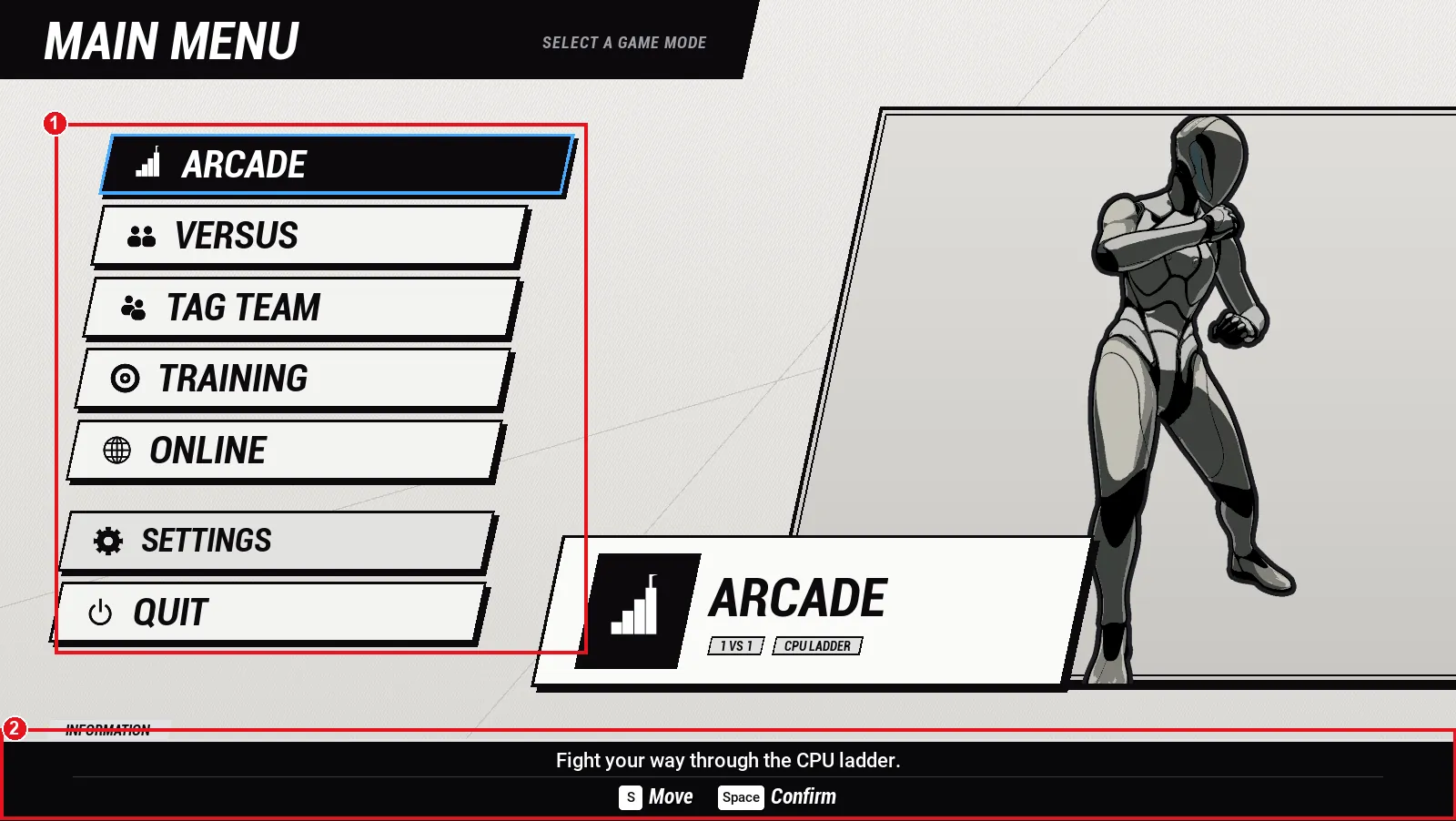
- One entry per AFT Game Mode asset (by
SortOrder, with its pictogram), then Settings and Quit - Information bar:
Descriptionof the focused mode
Properties
| Property | Description |
|---|---|
DisplayName, Description, Icon | Shown by the main menu. |
MatchType | Versus, TagTeam, Arcade, Training or Online: drives the menus flow and the defaults. |
SortOrder | Order in the main menu. |
TeamSize | Fighters per team, 1 to 3 (2 or 3 for tag team). In a tag team mode it is the default of the TEAM SIZE match option: the players can switch between 2 VS 2 and 3 VS 3, see Teams of 3. |
bAllowCPUOpponent | The player 2 side may be a CPU (versus) or must be one (arcade, training dummy). |
bRequiresTwoPlayers | Two local players are required (local versus only). |
bShowStageSelect | Show the stage select screen (otherwise the ladder or a random stage is used). |
Rules | Battle rules of the mode. Empty = AFT Core > Default Rules. |
ArcadeLadder (Default Arcade Ladder) | Arcade only: the ladder of the fighters that have no ladder of their own. Empty in the template: those fighters fight every other fighter of the roster (see Which ladder). |
EntryScreen | Optional screen that replaces the default flow (for example your own online lobby). |
Arcade
The classic arcade mode: player 1 picks a fighter, then beats CPU opponents one fight after the other until the last one. Each fighter has its own arcade ladder, a data asset that lists its fights: opponent, stage, CPU level and match settings of each fight.
- Main menu > Arcade opens the character select directly: no side select, no match options. Only player 1 picks: the screen has no 2P side and no picks card (a second player's buttons do nothing), the information bar gives the number of fights of the hovered fighter.
- As soon as player 1 confirms, the first fight starts. There is no stage select: each fight has its stage.
- After each fight, the result screen shows the ladder (one step per fight, the won ones lit) and offers:
| Result | Title | Choices |
|---|---|---|
| Win, not the last fight | PLAYER 1 WINS | Next Fight, Main Menu |
| Win of the last fight | ARCADE CLEAR | Main Menu, Character Select |
| Loss or draw, a continue left | CONTINUE? | Continue (the same fight again, on the same stage: one continue used), Main Menu |
| Loss or draw, no continue left | GAME OVER | Main Menu, Character Select |
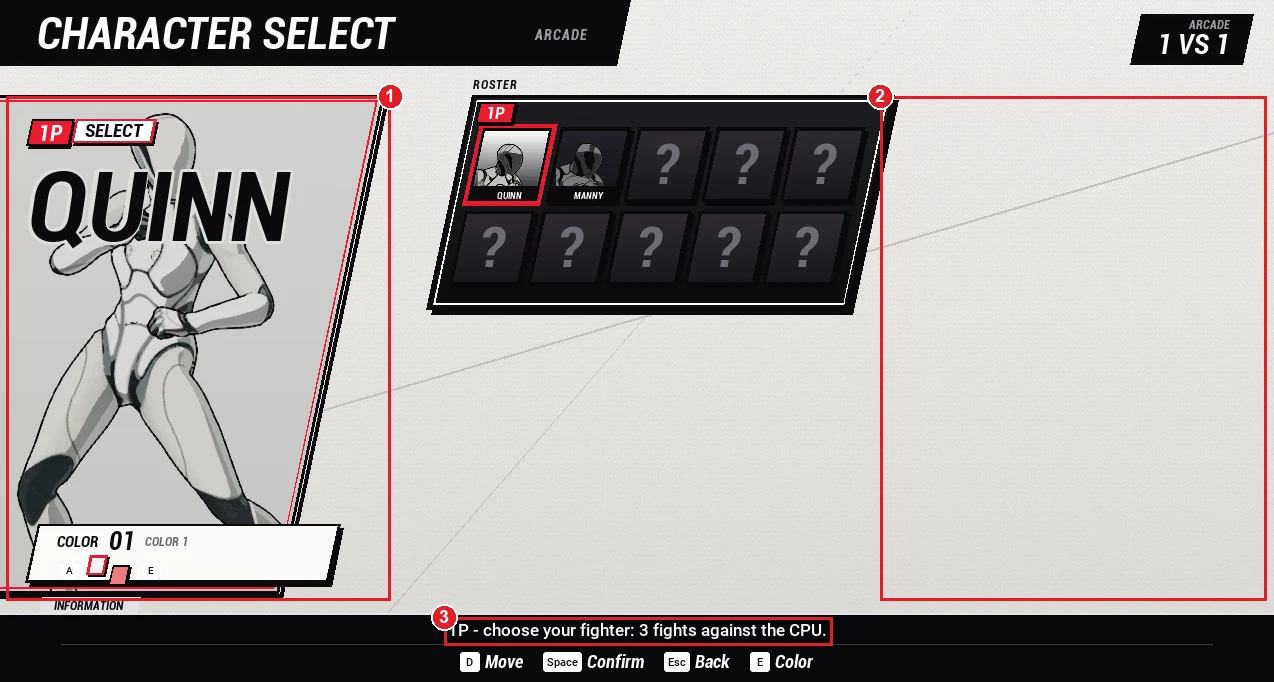
- Only player 1 picks: its side (fighter, color) and a single cursor on the roster
- No 2P side and no picks card: the CPU opponents come from the ladder of the picked fighter
- The number of fights of the hovered fighter
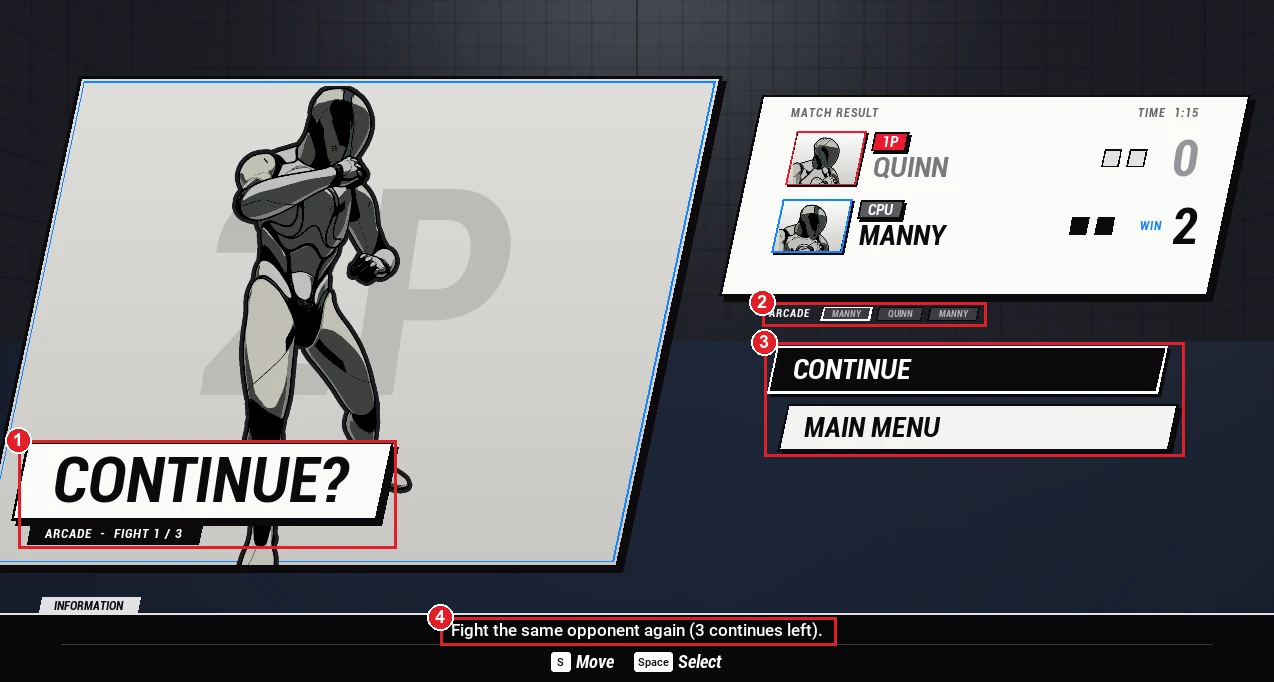
- Loss with a continue left: CONTINUE?, and the fight number in the ladder
- The ladder: one step per fight (its opponent), the won ones lit
- Continue fights the same opponent again, Main Menu leaves the arcade
- The continues left
Arcade ladder
An AFT Arcade Ladder (UAFTArcadeLadder, Content Browser > AFT Fighting > AFT Arcade Ladder) holds the fights of a
fighter:
| Property | Description |
|---|---|
Fights | The fights in order. Win one to play the next, win the last one to clear the arcade. |
Continues | Continues after a loss: the same fight again. -1 = infinite (default of a new ladder), 0 = game over at the first loss. The template ladders have 3. |
Each fight (FAFTArcadeFight):
| Property | Description |
|---|---|
Opponents | The CPU team: fighter and palette of each member (one in the 1 VS 1 arcade mode). Empty, or a member without a fighter, = the next fighter of the roster (see below). When the opponent is the player's fighter in the same palette, the battle shows it in its next palette, like a Versus mirror match. |
Stage | Stage of the fight. Empty = a random stage, drawn once: a continue keeps it. |
CpuLevel | CPU level, 1 to 8. |
CpuProfile | A CPU profile for this fight only (a boss AI, for example). Empty = the CPU Profile of each opponent. |
Rules | Battle rules of this fight (health, meter, walls...). Empty = the rules of the arcade mode. |
MatchOptions | Tick it to set the match settings of this fight: rounds to win, round time, intros, assists and shared meter (the FAFTMatchOptions of the match options screen), applied over the rules. Its CPU Level and Team Size are not used: the CpuLevel of the fight and the TeamSize of the mode are. |
Title | Optional caption, shown on the result screen after the fight number (FIGHT 3 / 3 - FINAL BATTLE). |
Which ladder
When player 1 picks a fighter, the arcade plays:
- the Arcade Ladder of the fighter (Fighter Data > Arcade > Arcade Ladder, see Fighter Data);
- else the Default Arcade Ladder of the arcade game mode (
DA_AFT_Mode_Arcade, empty in the template); - else a ladder made from the roster: one fight per other fighter, in roster order (
RosterOrder), on a random stage, CPU level 3 rising to 7, with the rules of the mode and infinite continues. A fighter alone in the roster fights itself (mirror match).
So a new fighter plays the arcade without any setup, and gets its own fights as soon as it has a ladder. An empty ladder (no fight) counts as none.
The empty opponents of a ladder take the other fighters of the roster in roster order, the ones the ladder does not name first: a default ladder of empty fights meets every fighter once before meeting one again.
Template ladders
| Ladder | Fight 1 | Fight 2 | Fight 3 |
|---|---|---|---|
Fighters/Quinn/DA_Quinn_Arcade | Manny (color 1), DA_Stage_Training, CPU 2 | Quinn (color 2), DA_Stage_Training_2, CPU 5, MIRROR MATCH | Manny (color 2), DA_Stage_Training, CPU 8, FINAL BATTLE, 3 rounds to win, 60 s |
Fighters/Manny/DA_Manny_Arcade | Quinn (color 1), DA_Stage_Training_2, CPU 2 | Manny (color 2), DA_Stage_Training, CPU 5, MIRROR MATCH | Quinn (color 2), DA_Stage_Training_2, CPU 8, FINAL BATTLE, 3 rounds to win, 60 s |
Both have 3 continues. Edit them in the editor (double click) to change the fights.
Test the arcade without the menus
Press Play on any map, open the console (the key under Esc) and type aft.Arcade <Fighter> [Fight], for example
aft.Arcade DA_Quinn 3 to start at the last fight of Quinn's ladder: its stage loads and the arcade goes on as from the menus
(result screen, next fight, continues). See aft.Arcade. From Blueprint:
Launch Arcade of the match subsystem.
Make the ladder of a fighter
- Content Browser > Add > AFT Fighting > AFT Arcade Ladder, next to the fighter:
DA_<Fighter>_Arcade. - Open it and add the fights in order: opponent and palette, stage, CPU level, and the match options or rules of a special fight (a boss with more rounds, less time, its own CPU profile).
- Open the fighter data and set it in Arcade > Arcade Ladder.
From Python, unreal.AFTEditorLibrary.create_arcade_ladder(fighter) does steps 1 and 3 and fills the new ladder with the default
fights of the fighter (one per other fighter of the roster, 3 continues), a starting point to edit (see
Python automation).
Versus and CPU
In Versus, the side select screen lets each device pick a side; a side without a device is played by the CPU. The CPU controller runs inside the deterministic simulation (seeded, levels 1 to 8), so it also works in the rollback modes. How it plays is set by the CPU profile of each fighter, edited in the CPU Editor.
Make your own mode
- Duplicate a mode asset (for example
DA_AFT_Mode_Versus) in your project folder. - Change
DisplayName,SortOrder,TeamSizeand assign your ownRules(for example 3 rounds, 60 seconds). - The main menu lists it automatically (Asset Manager type
AFTGameMode).
From Blueprint
UAFTMatchSubsystem (game instance subsystem) holds the menus data and can drive a match without the default screens:
| Function | Description |
|---|---|
GetRoster, GetStages, GetGameModes | Fighters, stages and modes found by the Asset Manager (locked ones optional). |
BeginMatchSetup(Mode) | Starts a new match setup for a mode. |
GetRequiredTeamSize | Team size of the current mode; in a mode with more than one fighter per team, the team size of the match options (2 or 3). |
SetTeamFighter(Team, Member, Fighter, Palette) | Picks a fighter. |
SetTeamController(Team, Controller, LocalPlayerSlot, CpuLevel) | Player, CPU or none. |
SetStage(Stage) | Picks the stage. |
GetPendingMatch, SetPendingMatch | The FAFTMatchConfig being built. |
LaunchMatch | Loads the stage level and starts the battle. In arcade, without a run yet, it calls StartArcade first. |
GetLastResult, Rematch, ReturnToMenus | After the battle. |
Arcade (category AFT | Match | Arcade):
| Function | Description |
|---|---|
StartArcade | Builds the ladder of the team 1 fighter (see Which ladder), resets the continues and prepares the first fight. The character select calls it when player 1 has picked. |
GetArcadeFights, GetArcadeFightIndex | The fights of the run (opponents resolved) and the index of the current one. |
GetArcadeFightsFor(Fighter) | The fights a fighter would play (preview before the pick). |
GetArcadeLadder | The ladder asset of the run (none when made from the roster). |
ContinueArcade | After a win: the next fight (after the last one: back to the main menu). |
RetryArcadeFight, CanContinueArcade, GetArcadeContinuesLeft | After a loss: use a continue and play the same fight again; a continue is left; continues left (-1 = infinite). |
IsArcadeComplete | The current fight is the last one: winning it clears the arcade. |
LaunchArcade(Fighter, FightIndex, Palette, Mode) | Tests and custom flows: a new arcade run with this fighter, from fight FightIndex (0 = first), launched at once (no menu). Mode empty = the first arcade game mode. Console: aft.Arcade. |
A custom arcade screen only needs BeginMatchSetup(ArcadeMode), SetTeamFighter(0, 0, Fighter, Palette) and LaunchMatch. The
static UAFTArcadeLadder::GetFighterLadder(Fighter) returns the ladder of a fighter.
See Blueprint API for the battle side.