Stages and Camera
A stage is made of three parts:
- a level with your stage art;
- an AFT Stage Info actor in that level (simulation origin and camera framing);
- an AFT Stage data asset that makes it selectable in the menus.
AFT Stage Info
Place one AFT Stage Info (AAFTStageInfo, Place Actors > AFT Fighting) in the stage level. Its transform is the origin of
the simulation: X = screen right, Z = up, the camera stands at +Y looking toward -Y. Without one, the world origin
is used.
| Property | Default | Description |
|---|---|---|
CameraDistance | 620 | Distance of the camera from the fighting plane (cm). |
CameraHeight | 150 | Height of the camera. |
CameraFOV | 52 | Field of view (degrees). |
ZoomOutPerDistance | 0.35 | Extra pull back when the fighters are far apart (cm per cm of distance beyond the minimum). |
VerticalFollow | 0.45 | How much the camera follows airborne fighters (0 to 1). |
PreviewHalfWidth | 1000 | Editor preview of the stage walls (half width from the origin). |
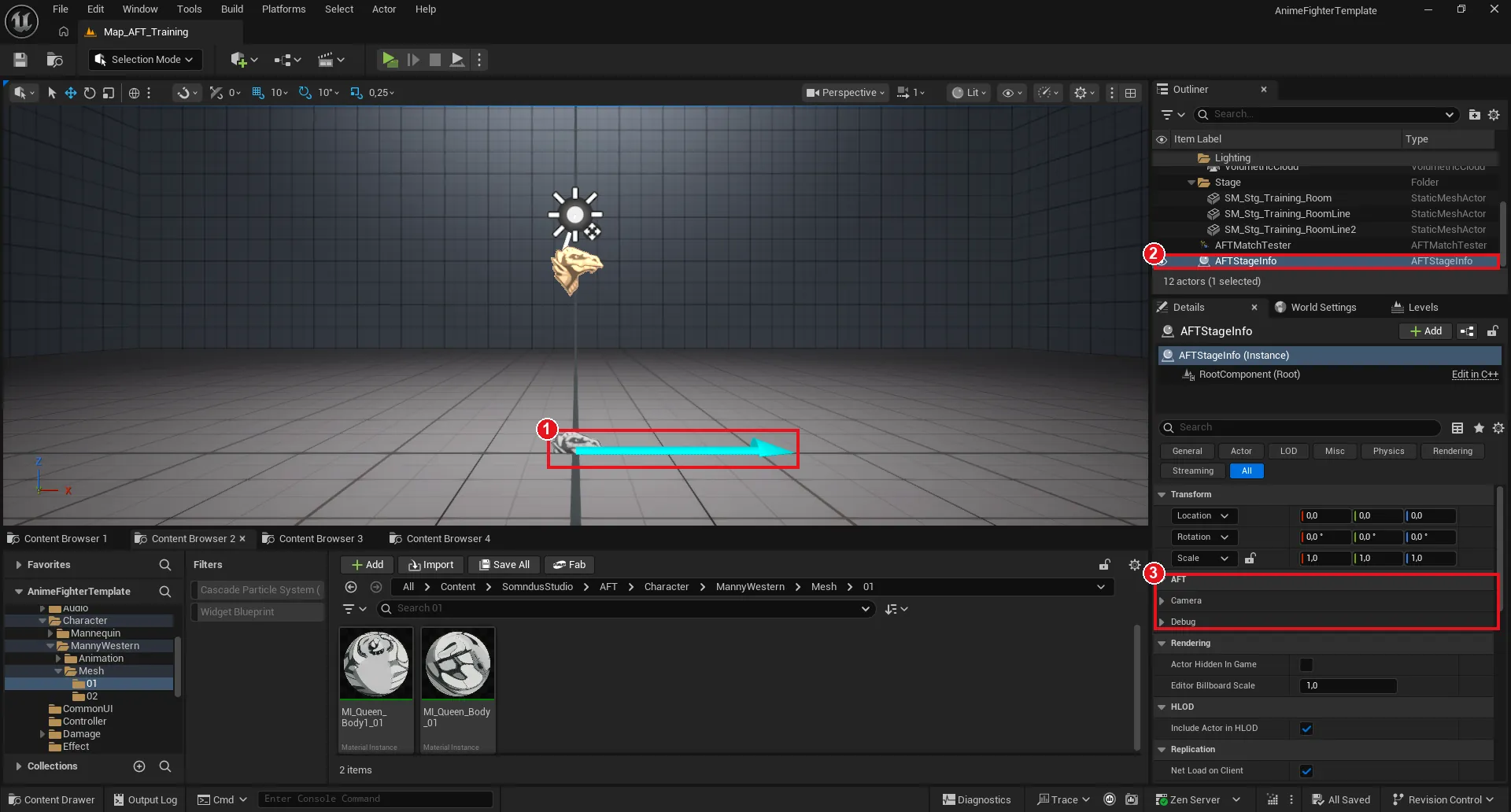
- The Stage Info origin and arrow: X = screen right
- The AFT Stage Info actor in the Outliner
- Its AFT settings (Camera, Debug)
AFT Stage data asset
Create it with Content Browser > right click > AFT > Stage (UAFTStageData, primary asset type AFTStage).
| Property | Description |
|---|---|
StageId | Unique id (save games, online validation). |
DisplayName | Name in the stage select screen. |
Level | The stage level. Empty = AFT Game > Default Battle Map. |
Thumbnail | Image of the stage select screen. |
Music | Music of the stage. |
HalfWidth | Half width of the playable area from the stage origin (the walls). Default 1000 cm (20 m wide stage). |
bLockedByDefault | Hidden until unlocked. |
SelectOrder | Order in the stage select screen. |
The template stages are DA_Stage_Training and DA_Stage_Training_2 (/Game/SomndusStudio/AFT/Stages/Training), both on the
level Map_AFT_Training: two entries so that the stage select screen shows up.
Battle map setup
The stage level is a battle map: set its GameMode Override to AAFTBattleGameMode (or use the project global default game
mode). Add an AFT Match Tester to play it directly from the editor; it is ignored when the match comes from
the menus (unless Override Menus is checked).
Battle camera
AAFTBattleCamera frames both fighters in 2.5D using the Stage Info settings (CameraDistance, CameraHeight, CameraFOV,
ZoomOutPerDistance, VerticalFollow).
| Property | Default | Description |
|---|---|---|
FollowSpeed | 8 | Smoothing of the camera movement. |
MinFighterDistance | 250 | Distance between the fighters (cm) under which the camera stays at CameraDistance; beyond it, it pulls back by ZoomOutPerDistance. |
ScreenEdgeMargin | 90 | Space always kept between each fighter (its position) and the left / right edge of the screen (cm). |
SuperFreezeZoom | 140 | Zoom in during a super freeze (cm). |
Both fighters always stay on screen. The camera pulls back as far as needed to fit both fighters plus ScreenEdgeMargin.
At the stage walls it stops at the edge of the stage, but never cuts the cornered fighter. The smoothing never lets a fighter
leave the screen either, even on fast dashes, throws or round starts; only the super freeze zoom may frame tighter. The
framing uses the field of view the viewport really shows (GetHorizontalHalfFOVTan, which follows the aspect ratio and its
axis constraint, Maintain Y-Axis FOV by default in Unreal), so it is right in 16:9, 4:3 and ultra-wide.
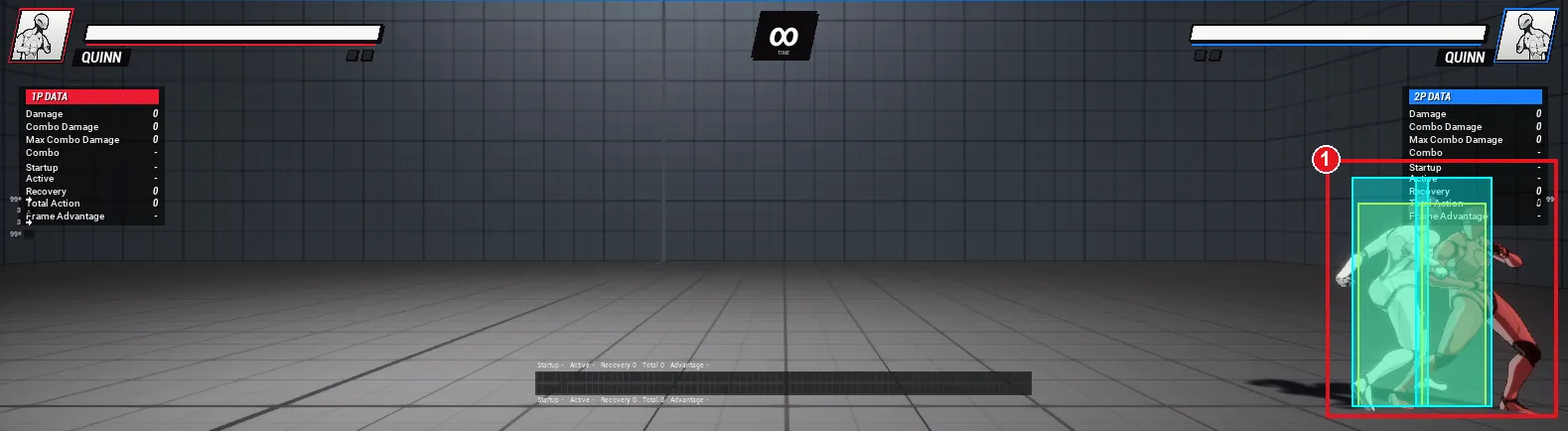
- Quinn runs the opponent into the corner: the camera stops at the stage wall, and both fighters stay inside the screen with their margin
The camera also shakes on impacts (hits, guards, hard landings, walls, KO): the CameraImpulse of the cues, with the Shake
properties of the camera (see Camera shake). The shake is added on top of the
framing and never moves the fighters. Derive the camera in Blueprint (the On Camera Updated event is called every frame) and
set your class in Project Settings > AFT Game > Battle Camera Class.
The fighters themselves are limited by MaxFighterDistance (battle rules) and by the stage walls (HalfWidth), with corner
pushback handled by the simulation.