Tag Team
A team can hold up to 3 fighters (TeamSize of the game mode): the template plays 3 VS 3 by default. One fighter is
on the field, the others are on the bench.
Everything happens inside the deterministic simulation, so tag team also works online.
- Tag: press the tag button (
G, named Tag) to swap the active fighter. It works from neutral, at the end of an action or in a special cancel window, on the ground. The partner enters withTagInSpeedandTagInInvulnerableFramesof invulnerability, playing itsAFT.Action.Tag.Inslot. The tag has a cooldown (TagCooldownFrames). In a team of 3, Back + Tag calls the other partner (see Teams of 3). - Assist: press the assist button (
H, named Assist) to call the partner for its assist action (Assistsof the fighter, or theAFT.Action.Tag.Assistslot) without interrupting the point fighter, with a cooldown (AssistCooldownFrames, or theCooldownFramesof the assist). In a team of 3, Back + Assist calls the other partner. - Red health: part of the damage (
RedHealthPercent) becomes recoverable red health, regenerated by benched fighters (RedHealthRecoveryPerFrame). - KO: when the active fighter is knocked out, the next partner still standing enters. The round is lost when the whole team is KO.
- Meter: one meter per team when
bSharedMeteris on.
Teams of 3
The template mode DA_AFT_Mode_TagTeam has a TeamSize of 3 (3 vs 3 with tags and assists.). The TeamSize of a tag team
game mode is only the default: the players choose 2 VS 2 or 3 VS 3 with the TEAM SIZE line of the
match options (Tab on the side select screen). The line is shown in the tag team modes only,
before Assists and Shared Meter, and the header of the options shows the choice (TAG TEAM - 3 VS 3).
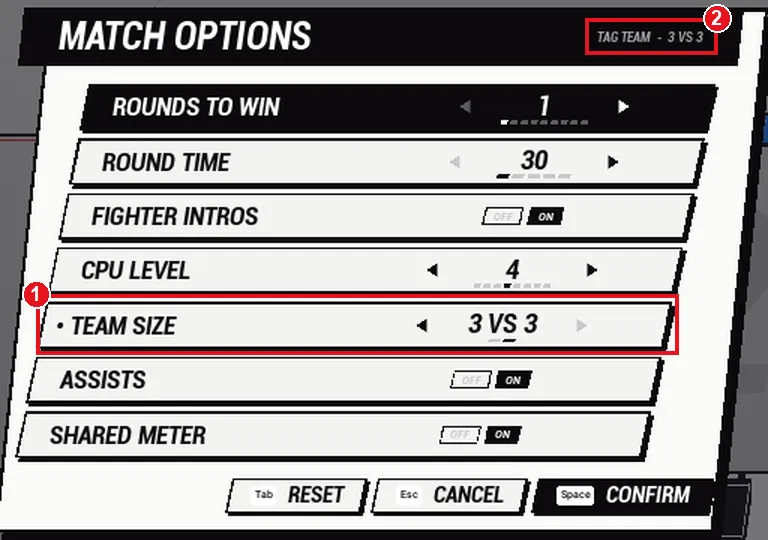
- TEAM SIZE: 2 VS 2 or 3 VS 3
- The mode and the chosen team size
The character select then asks each side for 3 fighters. With 3 slots per side, the team slots are narrower so that both teams fit on the TAG TEAM card. A fighter can be picked more than once in a team: with Quinn and Manny in the template roster, a team of 3 picks one of them twice.
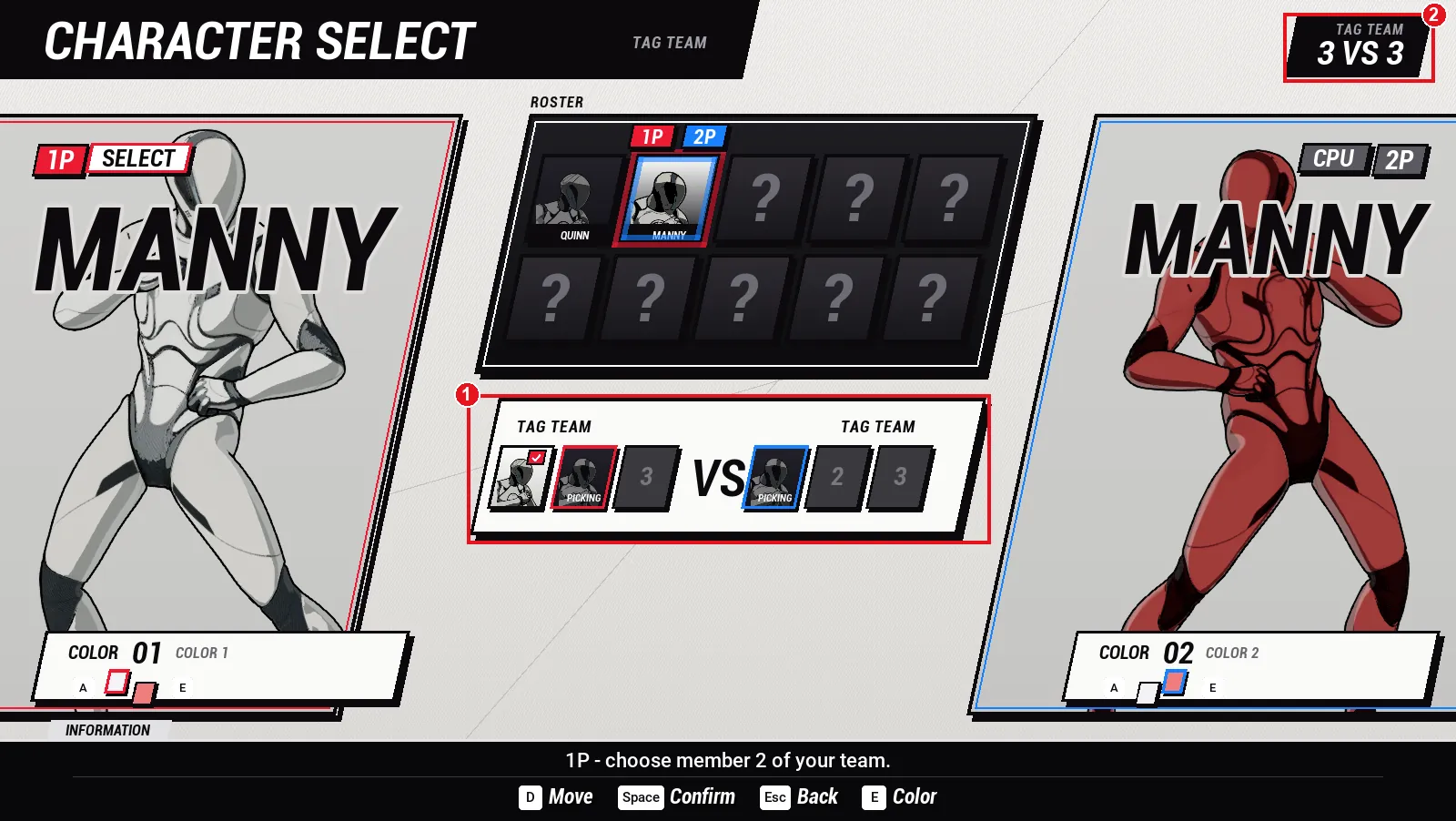
- The team slots of each side: 1P has picked member 1 (check mark) and picks member 2
- The mode chip: TAG TEAM 3 VS 3
In a team of 3, the buttons choose the partner (the members are in a circle: active member + 1 is the next partner):
| Input | Partner called |
|---|---|
| Tag or Assist | The next partner (active member + 1) |
| Back + Tag or Back + Assist (holding back) | The other partner (active member + 2) |
If the partner chosen cannot come (KO, or already on the field), the other one comes. When the point fighter is knocked out, the
next partner still standing enters, and the round ends only when the three are KO. The choice happens inside the deterministic
simulation, so it also works online. The tag and assist buttons do not change (G and H).
From code: FAFTMatchOptions::TeamSize (2 or 3, 3 by default) and UAFTMatchSubsystem::GetRequiredTeamSize, which follows the
match options in a mode with more than one fighter per team. SetMatchOptions resizes the teams of the match being prepared. A
tag team match started without a mode asset uses 3 fighters per team.
Tag team rules
FAFTTagTeamRules (in every battle rules asset, used when the match has more than one fighter per team):
| Property | Default | Description |
|---|---|---|
bSharedMeter | on | One meter per team instead of per fighter. |
TagCooldownFrames | 180 | Frames between two tags. |
bAllowAssists | on | Enable assists. |
AssistCooldownFrames | 240 | Frames between two assists. |
RedHealthRecoveryPerFrame | 3 | Red health regenerated per frame by benched fighters. |
RedHealthPercent | 50 | Part of the damage that becomes red health. |
TagInInvulnerableFrames | 20 | Invulnerability of the incoming partner. |
TagInSpeed | 14 | Speed of the incoming partner (cm per frame). |
TagButton | G | Tag button(s). A to F are the six attack buttons. |
AssistButton | H | Assist button(s). |
The default keys of G and H are P / M on the keyboard and L1 / L2 (LB / LT) on a gamepad, see
Input and Controls. DA_AFT_DefaultRules and DA_AFT_TagTeamRules use these
defaults.
The template mode DA_AFT_Mode_TagTeam uses DA_AFT_TagTeamRules: team size 3 by default (2 VS 2 in the match options),
1 round, 120 seconds.
HUD
In 2 VS 2, the battle HUD shows the active fighter of each team, and under it the partner: its portrait, its health and the TAG /
ASSIST chips, lit when the tag and the assist are ready. The hatched part of the health bar is the recoverable (red) health.
With bSharedMeter, the meter gauge is the team meter. Your own HUD reads the same data in FAFTTeamView (Members,
TagCooldown / AssistCooldown, 0 = ready).
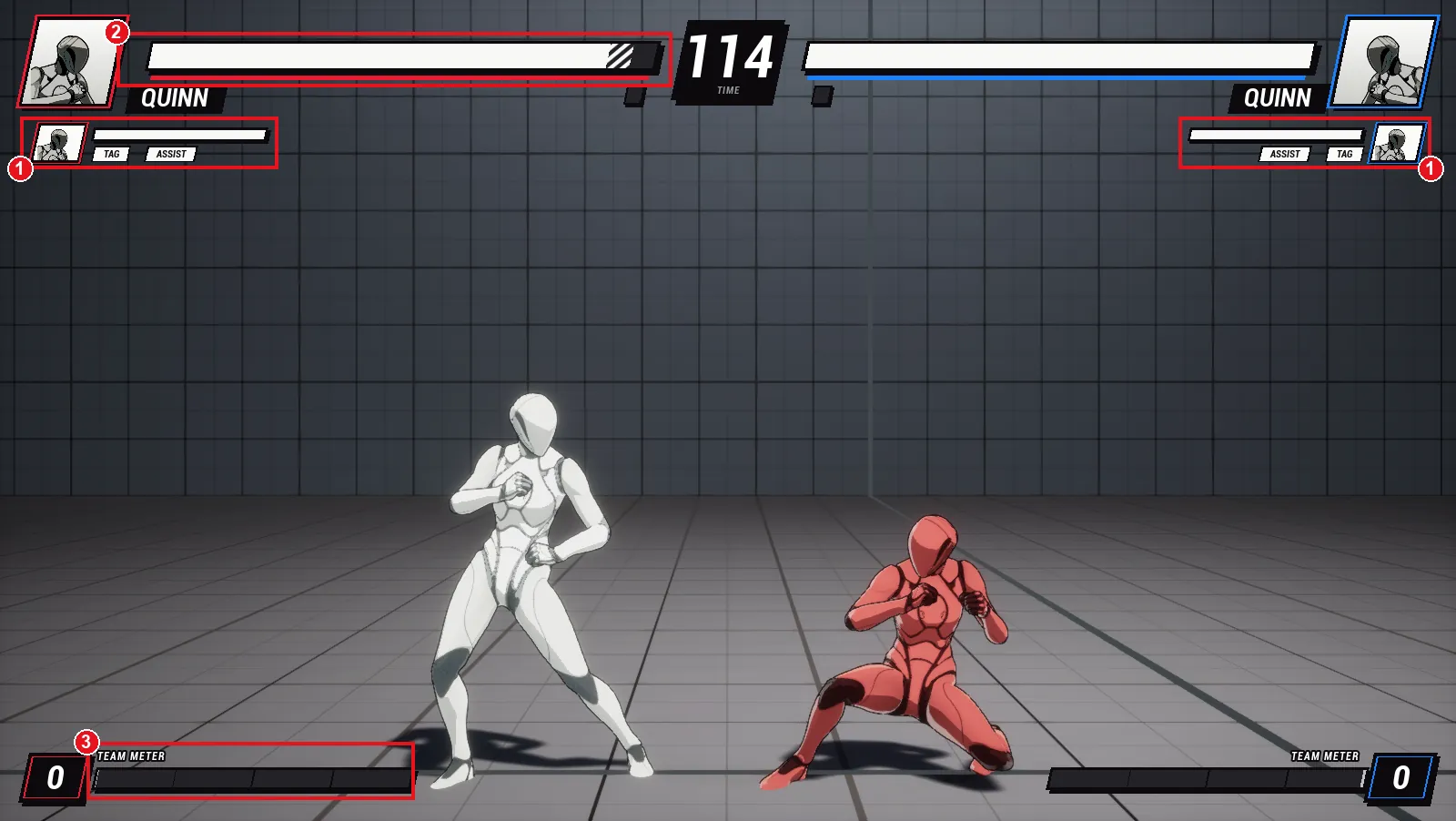
- The partner: portrait, health, TAG / ASSIST readiness
- Health bar of the active fighter, with the recoverable health (hatched)
- Team meter
In a team of 3, each side shows two partner tiles, in calling order: the first one with the TAG / ASSIST chips, the second one with BACK+TAG / BACK+ASSIST. The chips are grey during the cooldowns, and a KO partner is drawn half transparent.

- The next partner: TAG / ASSIST
- The other partner: BACK+TAG / BACK+ASSIST
- Just after a Back + Tag: TAG and BACK+TAG are grey during the tag cooldown, ASSIST and BACK+ASSIST stay ready
Test it
Use the Tag Team preset of the Match Tester: it plays 3 VS 3, with three fighters per team from Quick Battle Fighters
or the roster. The AFT.Core.Simulation.TagTeamThree and AFT.Visual.TagTeamThree
tests cover the teams of 3.