Match Tester
The AFT Match Tester (AAFTMatchTester, Place Actors > AFT Fighting) plays a match without the menus when the level is
played directly. Drop it in a battle map, configure the match in its Details, press Play. Map_AFT_Training contains one with the
Training preset.
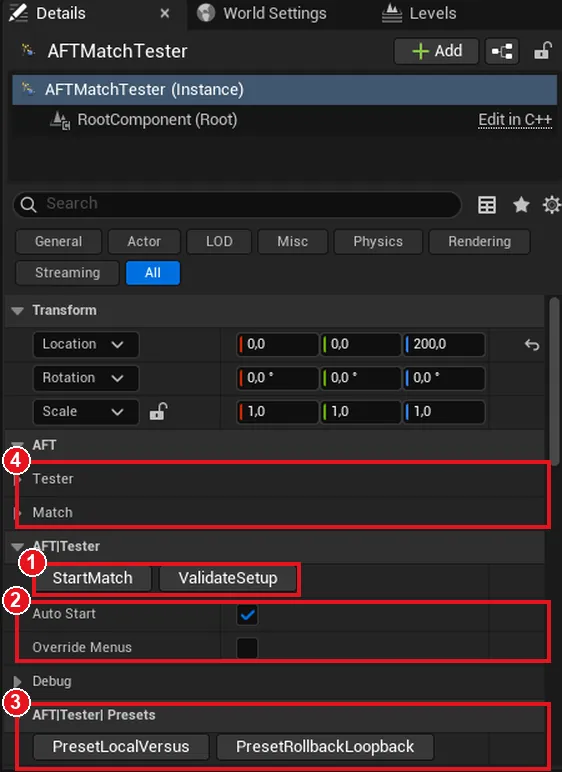
- Start Match and Validate Setup
- Auto Start and Override Menus
- Preset buttons
- Tester and Match settings (the match configuration)
Settings
| Property | Description |
|---|---|
Match | The full FAFTMatchConfig: match type, mode, Team 1 / Team 2 (fighters and palettes, controller Player / CPU / None, CPU level, CPU profile override, local player slot), stage, rules, net mode, network settings, seed, skip intro. |
bAutoStart | Start the match when the level begins (default on). |
bOverrideMenus | Use this setup even when the menus prepared another match. |
bShowBoxes | Draw the collision boxes of the tester's match. Not applied when the level plays a match launched by the menus (unless bOverrideMenus). |
bLoopMatches | Restart automatically when the match ends (soak and determinism testing). |
Empty fighters are filled from AFT Game > Quick Battle Fighters, or from the roster.
Presets
Click a preset button to fill the config:
| Preset | Configuration |
|---|---|
| Versus CPU | Player 1 vs CPU. |
| Local Versus | Two local players (share the keyboard or use two gamepads). |
| Tag Team | 3 VS 3 (three fighters per team, like the template Tag Team mode), tag team rules. |
| Training | Training match: player 1 vs the dummy, training HUD, hitboxes on. |
| Rollback Loopback | Two rollback peers in process: 50 ms latency, ±10 ms jitter, 2 % packet loss, frame delay 1. See Testing the Netcode. |
| Sync Test | Every frame rolled back and checked for determinism. |
Validate Setup
Validate Setup compiles the configuration (fighters, actions, state graph, rules, stage) like a real match start and logs every error without playing: missing fighter, invalid command, broken state graph... Use it after big data changes.
Start Match starts the configured match from the details panel or from Blueprint.
Match Tester and menus
When the match comes from the menus, the battle game mode uses the menus config and ignores the tester, unless
bOverrideMenus is checked. The resolution order is: tester with Override Menus -> menus -> tester -> Quick Battle Fighters.