Fighter Data Asset
A playable character is one AFT Fighter data asset (UAFTFighterData, primary asset type AFTFighter). It owns everything the
simulation and the presentation need: stats, default boxes, actions, command list, state graph, tag team assists, mesh, palettes,
effects and cinematics.
- Create one: Content Browser > right click > AFT > Fighter, or generate a complete fighter with the fighter wizard.
- Edit it: double click it to open the Fighter Editor. The Fighter tab of the editor shows every property below.
- The roster of the character select screen is built from every
AFTFighterasset found by the Asset Manager.
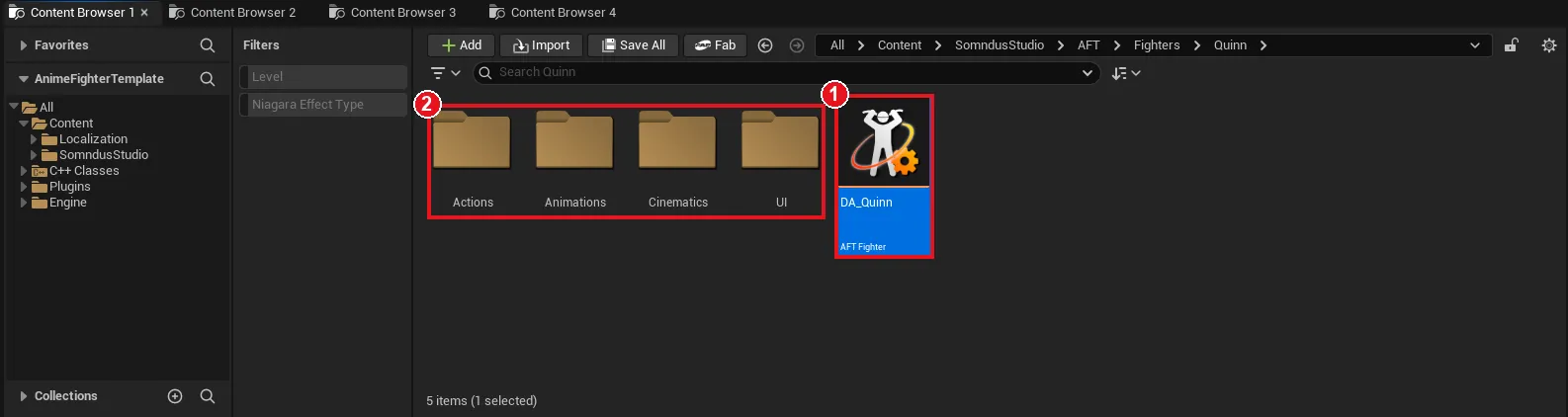
DA_Quinn, an AFT Fighter data asset: double click it to open the Fighter Editor- Its
Actions,Animations,CinematicsandUIfolders
Identity and UI
| Property | Description |
|---|---|
FighterId | Unique id (save games, online validation, unlocks). Also used to name the cinematics (LS_<FighterId>_Intro). |
DisplayName | Shown by the menus. |
Description | Free text about the fighter. The template screens don't show it: use it in your own screens. |
ThemeColor | Color of the fighter in the UI (character select, HUD). |
bLockedByDefault | Hidden from the roster until unlocked. |
RosterOrder | Order in the character select grid. |
Icon, Portrait, FullArt | Textures used by the menus and the HUD. Render them with the Character Render Studio. |
Simulation
| Property | Description |
|---|---|
Stats | Health, defense, weight, walk / dash / jump speeds, gravity, air jumps and air dashes (see below). |
DefaultBoxes | Stand / crouch / air hurtboxes and push boxes used when the current action frame has no box of its own. |
Actions | Every action of the fighter (the Fighter Editor action list). |
ActionSlots | Common roles (idle, walk, hit reactions, match poses...) mapped to actions, by GameplayTag. |
Commands | Move list: input notation -> action. See Commands and Cancels. |
StateGraph | Neutral / movement state machine. Empty = AFT Core > Default State Graph. See State Graph Editor. |
Assists | Tag team assist actions, with an optional cooldown override. |
CpuProfile | How the fighter plays as a CPU (Simulation | CPU). Empty = AFT Core > Default Cpu Profile, else tactics generated from the move list. See CPU Opponents. |
ArcadeLadder | The arcade mode of the fighter (Arcade): an AFT Arcade Ladder, its fights in order (opponent, stage, CPU level, match settings). Empty = the default ladder of the arcade mode, else one fight per other fighter of the roster. See Arcade. |
Stats
All speeds are in cm per frame (the simulation runs at 60 frames per second), stored in fixed point.
| Stat | Default | Stat | Default |
|---|---|---|---|
MaxHealth | 10000 | JumpVelocity | 17 |
DefensePercent (damage taken) | 100 | SuperJumpVelocity | 21 |
WeightPercent (combo gravity) | 100 | JumpForwardSpeed / JumpBackwardSpeed | 4.2 / 3.8 |
WalkForwardSpeed / WalkBackwardSpeed | 3.2 / 2.6 | AirDashSpeed | 10 |
DashForwardSpeed / BackdashSpeed | 9 / 8 | Gravity (cm per frame²) | 0.95 |
AirJumps / AirDashes | 1 / 1 | MaxFallSpeed | 26 |
A Velocity event can read a stat (Walk Forward, Dash Forward, Jump Velocity...) instead of a literal value. The standard movement actions do so, which lets several fighters share the same actions with different speeds.
Action slots
The state graph and the simulation never reference an action directly: they request a slot (a GameplayTag under AFT.Action)
and each fighter maps the slot to its own action. The wizard fills them automatically.
| Group | Slots |
|---|---|
| Neutral and movement | AFT.Action.Idle, Crouch, StandToCrouch, CrouchToStand, Turn, WalkForward, WalkBackward, DashForward, Run, RunBrake, Backdash, JumpSquat, JumpNeutral, JumpForward, JumpBackward, Fall, Landing, AirDashForward, AirDashBackward |
| Guard | AFT.Action.Guard.Stand, Guard.Crouch, Guard.Air |
| Hit reactions | AFT.Action.Hit.StandLight, Hit.StandMedium, Hit.StandHeavy, Hit.Crouch, Hit.Air, Hit.AirRecovery, Hit.Launch, Hit.Knockdown, Hit.WakeUp, Hit.WallBounce, Hit.WallSplat, Hit.GroundBounce, Hit.Crumple, Hit.Thrown |
| Match | AFT.Action.Match.Intro, Match.WinPose, Match.KO, Match.TimeOverLose |
| Tag team | AFT.Action.Tag.In, Tag.Out, Tag.Assist |
Only AFT.Action.Idle is required. Missing slots fall back to a close one so that an incomplete fighter stays playable: medium /
heavy / crouch hits use Hit.StandLight, launch / bounces / thrown use Hit.Air (Hit.WallSplat tries Hit.WallBounce first), crouch and air guard use Guard.Stand, KO uses
Hit.Knockdown, and the last resort is Idle (or Fall in the air). A state of the state graph whose slot is missing falls
back to Idle (a warning is logged). For example the Run state of the default graph needs
AFT.Action.Run and AFT.Action.RunBrake.
Presentation
| Property | Description |
|---|---|
VisualClass | Actor spawned to display the fighter. Empty = AAFTFighterActor (or AFT Game > Default Fighter Actor Class). |
Mesh | Skeletal mesh of the fighter. |
AnimClass | Anim instance (battle and the 3D character select). Empty = UAFTFighterAnimInstance, which samples the Animation events of the action at the exact simulation frame. |
MeshOffset | Transform of the mesh relative to the fighter origin (feet on the ground, facing +X). |
Palettes | Color variations (material overrides). See Palettes and Toon Outline. |
OverlayMaterial | Material drawn over the whole mesh, typically the anime outline. |
CueSet | Effects and sounds of the fighter. See Effects and Sounds. |
IntroSequences, VictorySequences | Level Sequences played before round 1 and when the fighter wins. See Cinematics. |
Validation
The fighter is validated on save and with the Validate button of the Fighter Editor, which also checks every action:
empty FighterId, missing AFT.Action.Idle slot, invalid command notations, commands without action, hitboxes referencing a
missing hit definition, Spawn Projectile events without projectile action... Every problem is listed in the Message Log
(AFT Fighter validation).