Palettes and Toon Outline
Palettes
A fighter has a list of palettes (Palettes, FAFTFighterPalette): each one is a color variation that replaces some
materials of the mesh.
| Property | Description |
|---|---|
DisplayName | Name of the color (Color 1, Color 2...). |
PreviewColor | Color swatch shown by the character select screen. |
Materials | One material per slot index of the mesh. Empty entries keep the mesh material. |
OverlayMaterial | Outline of this color. Empty = the fighter OverlayMaterial. |
The player picks the palette on the character select screen (Tab left / right, L1 / R1 on a gamepad), and the
3D fighter of the side panel takes the new colors at once. The palette is part
of the match setup (FAFTTeamMemberConfig.Palette), so both online peers see the same colors. The Fighter Editor preview uses
the first palette.
In a mirror match (both sides pick the same fighter and color), the second fighter automatically takes another palette, so the two characters can be told apart. This only changes the presentation: the simulation is the same.
In C++, UAFTFighterData::ApplyPalette(MeshComponent, PaletteIndex) applies the materials and the overlay of a palette to any mesh
component (game, editor preview, character select 3D preview...).
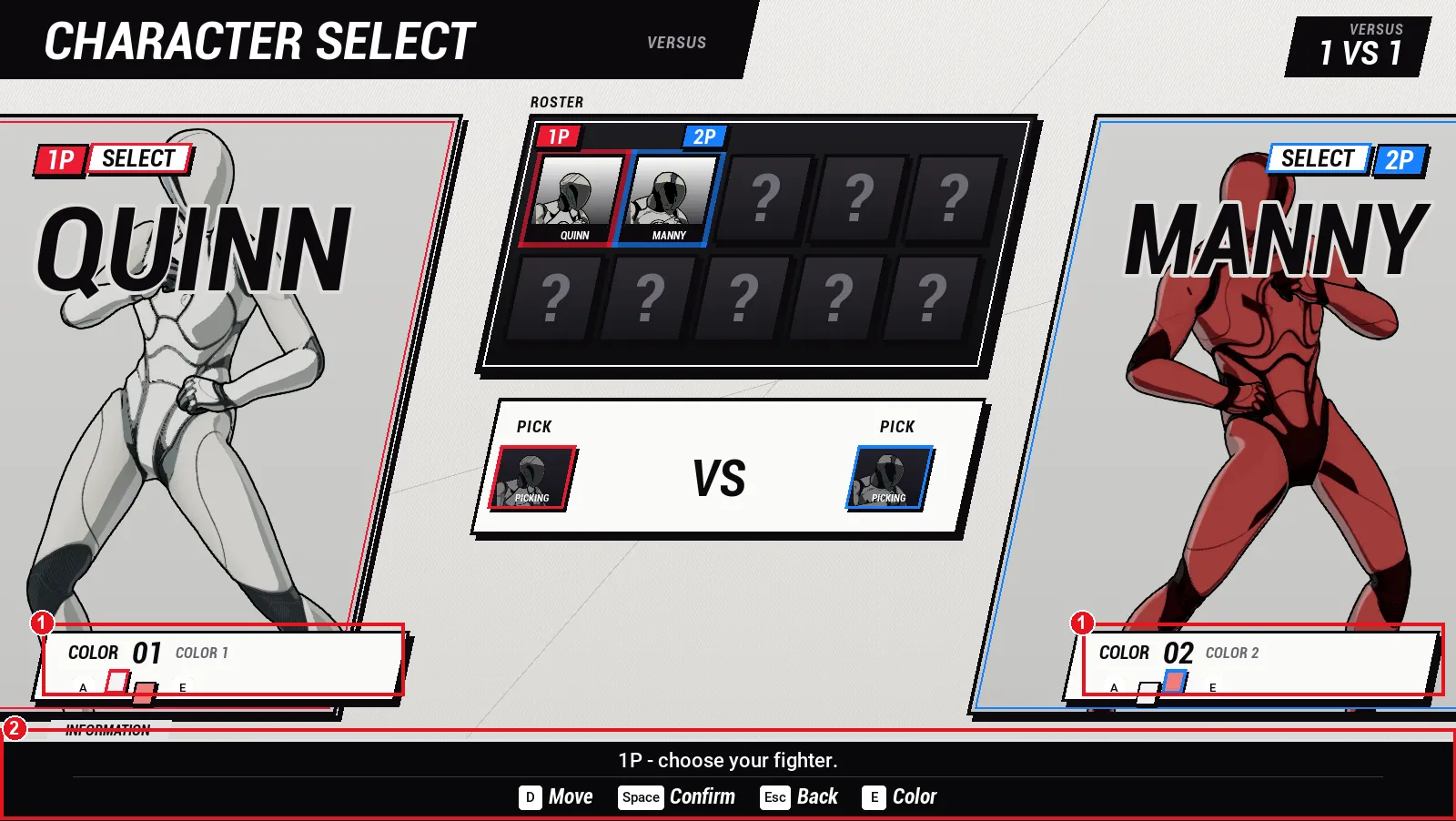
- Selected color of each side (COLOR 1, COLOR 2)
- The Color button hint of the information bar
Toon shader and outline
The sample fighter uses the anime toon material of the template, M_AFT_ToonMaster (/Game/SomndusStudio/AFT/Materials/Toon),
through material instances (/Game/SomndusStudio/AFT/Characters/Mannequin/Materials): each palette points to a set of instances (MI_Queen_Body_01, MI_Queen_Body1_01 for Color 1, _02 for
Color 2). Manny has the same set (MI_AFT_Manny_Body_01, MI_AFT_Manny_Body1_01, _02) with his own textures. The material
also reads the vertex color of the mesh: keep it white on your meshes (a mesh without vertex colors renders black, always in
shadow).
The outline is an overlay material: Unreal draws it over the whole mesh in a second pass (Overlay Material of the
mesh component). The template uses an inverted hull outline, MI_AFT_MNQ_Outline, set as the fighter OverlayMaterial:
- no extra mesh and no post process: the outline follows the skinned mesh and works with any number of fighters;
- a palette can use another outline (
OverlayMaterialof the palette), for example a darker one for a dark color.
A simpler outline material, M_AFT_SimpleAnimeOutline, is in /Game/SomndusStudio/AFT/Materials/Toon.
Mirroring (Guilty Gear look)
When a fighter faces left, AAFTFighterActor mirrors the mesh along the fighting axis instead of rotating it
(bMirrorInsteadOfRotate, on by default): the same side of the character always faces the camera, like in 2D anime fighters.
Turn it off in a Blueprint child of AAFTFighterActor (set as AFT Game > Default Fighter Actor Class or as the fighter
VisualClass) to rotate the character instead.
The mirror is a negative scale on the mesh. When a fighter changes side during the fight (a cross-up, a throw, a training reset), the actor recreates the render state of the mesh, so it is never drawn inside out (back faces, outline on the wrong side). The preview opponent of the Fighter Editor and player 2 of the character select are mirrored the same way.
Lighting of a mirrored fighter
M_AFT_ToonMaster is unlit and lights itself with the direction of the sun (the Atmospheric Light Vector). Without a fix,
a mirrored fighter would be lit from its other side. The fighter actor writes custom primitive data on its mesh, and the
toon material reads them to reflect its light direction across the fighting axis. Both sides of the screen then look the same,
like in the Arc System Works games.
| Custom primitive data | Value | Material parameter (group AFT Mirror) |
|---|---|---|
| Index 0 | Mirror sign: 1, or -1 while the mesh is mirrored. | AFT_MirrorSign |
| Indices 1 to 3 | Fighting axis (world direction). | AFT_FightAxis |
The reflected light direction is L - Axis * dot(L, Axis) * max(0, -2 * Sign):
- sign -1 (mirrored): the light is mirrored across the fighting axis;
- sign 1, or 0 on a mesh without custom primitive data (editor previews, the Character Render Studio, UI renders): the light is unchanged.
The shadows cast on the floor still follow the real sun.
A self-lit material of the fighter mesh (hair, weapon, the material of another fighter) must do the same, or a mirrored
fighter is lit from the other side: add two parameters with Use Custom Primitive Data on (AFT_MirrorSign at index 0,
AFT_FightAxis at index 1) and reflect its light vector with the formula above.
Animation
UAFTFighterAnimInstance (the default AnimClass) samples the animation of the current action at the exact simulation frame:
the pose always matches the hitboxes, even after a rollback. It crossfades between actions (ActionBlendTime of the fighter
actor, 0.06 s by default, or the BlendInTime of an Animation event) and locks the root motion (bLockRootMotion, on by
default): the horizontal translation of the root bone is cancelled, because the movement comes from the simulation, not from the
animation. The height of the root is kept, so the animations must be made in place, with the root at rest in the jumps: see
In-place animations.