Actions and Frame Events
An action (UAFTActionAsset, Content Browser > right click > AFT > Action) is one move or state of a fighter: idle,
walk, a jump, a hit reaction, a normal, a special, a super, a projectile... It lasts a fixed number of simulation frames
(60 per second) and holds frame events placed on a timeline. Actions are edited in the Fighter Editor.
Action properties
| Property | Description |
|---|---|
DisplayName | Name in the move list and the editor. |
Category | Neutral, Movement, Normal, CommandNormal, Special, Super, Throw, Reaction, Match, Other. Drives the cancel rules (normal -> special -> super) and the frame meter. |
Stance | Standing, Crouching or Airborne during the action: selects the hurt reaction and which attacks can be blocked. |
TotalFrames | Length of the action, 1 to 3600 frames. |
bLoop, LoopStartFrame | Looping actions (idle, walk...) restart at LoopStartFrame. An action that holds its last pose loops on its last frame: see Hold the last pose. |
bFaceOpponentOnStart | Turn toward the opponent when the action starts. |
MeterCost | Meter required and spent to start the action from a command (supers). |
OpponentAnimation | Animation played on the opponent held by this action (held throws, cinematic supers), sampled at the same action frame. It plays on every opponent that shares its skeleton (or a compatible one); an opponent on another skeleton plays its own Thrown action at the hold time instead. |
bEndOnLanding, LandingAction | Airborne actions end when landing, with this action (empty = the fighter Landing slot). |
Hits | Hit definitions referenced by the hitbox and throw events, see Hits and Boxes. |
Tracks | The timeline (edited in the Fighter Editor), including the animation of the action: see Animation. |
PreviewFighter, PreviewOpponent, DesignerNotes | Editor only: fighter used to preview the action when it is opened on its own, preview opponent (empty = the edited fighter in its second color), free notes. |
Tracks and events
The timeline is a list of tracks (name, color, muted flag). Each track holds events: an event has a StartFrame
(0-based), a Duration in frames, an Enabled flag and its data. An event is executed by the simulation on every frame of
[StartFrame, StartFrame + Duration). Muted tracks and disabled events are ignored. Events of one track may overlap: the
timeline draws them on sub-lanes.
To change the length of an action, use the frame commands of the timeline right click menu (insert, duplicate or delete frames,
Set length...) rather than TotalFrames: they move the events, the loop start frame and the Go To Action frames of the
action with the frames, and keep the animation poses. See Right click menu.
All events are deterministic data: they run inside the rollback simulation, so a move re-simulated after a rollback gives exactly the same result.
Event types
Animation
Plays an animation segment, sampled at the action frame (presentation only, perfectly synced with the simulation).
Animation, StartTime (seconds at the first frame of the event), PlayRate, bLoop, BlendInTime.
Animation events are the only place for the animation of an action: an action has no animation property. By convention
they go on the Animation track of the timeline (the first track of a new action). Most actions have one Animation event
over all their frames, looping like the action (for example DA_Quinn_Backdash). Several events can chain animations or
segments of one animation: on a frame covered by two events, the last one in timeline order plays. A frame without an
Animation event has no animation, so cover every frame.
From code:
SetAnimation(Animation, PlayRate)(Blueprint callable) replaces every Animation event with one event over the whole action (frame 0 toTotalFrames). The animation loops only when the action loops from its first frame (bLoopwithLoopStartFrame0). The wizard and Generate common actions use it.GetMainAnimation()(Blueprint pure) returns the animation of the event that starts first.
Hold the last pose
An action that ends on a pose and stays there (KO, knockdown, air hit, launch, thrown) loops on its last frame: bLoop on and
LoopStartFrame = TotalFrames - 1. Its animation is not looped, so the fighter holds the last pose of the animation until the
next action. With LoopStartFrame 0, the animation would restart and the downed fighter would twitch. Quinn's actions use it:
DA_Quinn_KO and DA_Quinn_Knockdown loop on frame 13, DA_Quinn_HitAir, DA_Quinn_HitLaunch and DA_Quinn_Thrown on
frame 32.
Hitbox
Attack box. Box (center X / Y, width, height, in cm, X forward), HitIndex (index in the action Hits). Several boxes that
share a HitIndex share one hit definition and connect once per target (or HitCount times for a multi hit).
Hurtbox
Vulnerable box (Box). When an action frame defines no hurtbox, the fighter default hurtbox of the current stance is used.
Pushbox
Overrides the body collision box (Box), or disables it with bDisable (cross-ups, dashing through the opponent).
Invulnerable
bStrike, bThrow, bProjectile invulnerability, or ArmorHits > 0 to absorb that many hits (super armor) instead.
Velocity
Sets, adds or scales the velocity. Mode (Set, Add, Scale in percent), bAffectX / bAffectY, X / Y in cm per frame
(X is relative to the facing: positive = forward), SourceX / SourceY and bEveryFrame (apply on every frame instead of the
first one only).
The source is Literal or one of the fighter stats: WalkForward, WalkBackward, DashForward, Backdash, JumpForward,
JumpBackward, JumpVelocity, SuperJumpVelocity, AirDashForward, AirDashBackward. With a stat source the value is a
multiplier (1.0 = the stat), so the same action works for fighters with different speeds.
Gravity
Gravity scale while active (GravityPercent, 0 = float, up to 500).
State Flags
Flags raised while the event is active: Airborne, Crouching, CounterHitState (getting hit now is a counter hit),
NoAutoTurn, Knockdown (only OTG hits connect), NoGuard, IgnoreScreenLimit.
Cancel Window
Opens a window in which other actions may interrupt the current one. Condition (Always, OnHit, OnBlock, OnContact,
OnWhiff), Categories (bitmask: Normal, CommandNormal, Special, Super, Jump, Dash, Movement, Throw) and
Actions: explicit targets (gatlings, target combos), allowed even when their category is not. See
Commands and Cancels.
Go To Action
Jumps to another action, or to a frame of the same action (loops, follow-ups, holds). TargetAction (empty = this action),
TargetFrame, Condition (Always, OnHit, OnBlock, OnContact, OnWhiff, ButtonHeld, ButtonNotHeld, Grounded,
Airborne, Random), Buttons (for the button conditions), ChancePercent (for Random, using the simulation random generator).
Spawn Projectile
Spawns a projectile driven by its own action: the hitboxes, velocity and cues of that action apply to the projectile.
ProjectileAction, Offset, Velocity (cm per frame, X relative to the facing), LifetimeFrames, Durability (hits before it is
destroyed), MaxActive (projectiles of this owner alive at once; the event is skipped beyond). Up to 16 projectiles exist at once.
Cue (VFX / Sound)
Plays a presentation cue resolved through the fighter cue set: Cue (GameplayTag under AFT.Cue),
Offset, bAttached (follow the fighter). Rollback safe: a cue is played once even if the frame is simulated again.
Meter
Gains (positive) or spends (negative) meter: Amount.
Super Freeze
Freezes everything but the owner (super flash): FreezeFrames, Cue. Super freeze frames are skipped by the frame meter.
Cinematic (Level Sequence)
Plays a Level Sequence over the event frames, in sync with the action frame: Sequence, StartTime (seconds of the sequence at
the first frame of the event), bHideHUD. Presentation only: the sequence never changes the timing of the action. The
Fighter binding is the fighter, Opponent the held opponent. Used by the cinematic supers, created by
Cinematics > New Action Cinematic (Super) of the Fighter Editor.
Throw
Throw box: connects only on throwable opponents (not in hit / block stun or throw protection) and ignores guard. Box,
HitIndex (hit definition used for the damage when the success action does not hold the opponent), SuccessAction (action of
the attacker on success, e.g. Throw_Success), bAirThrow.
Hold Opponent
Holds the opponent grabbed by a throw (put it in the success action) or by a hit with a HoldActionOnHit (put it in that
action, see Cinematic Supers). On every frame of the event, the opponent (its feet) is
placed at Offset from the fighter (X forward, Y up, in cm). With bInterpolate, it moves in a straight line to EndOffset over
the event. Facing: FaceHolder (grabbed from the front) or SameAsHolder. Between two hold events, the opponent stays at the
last offset. See Held throws.
Release Opponent
Throws the held opponent (instant): applies the hit HitIndex of this action (damage, cue, meter) and launches the opponent with
Velocity (cm per frame, X forward from the fighter: negative = behind, Y up). The opponent lands in a hard knockdown.
Face Opponent
Turns toward the opponent (instant).
Blueprint Event
Runs a frame event made in Blueprint: pick its class (parent AFT Frame Event Blueprint) in the Event details, where its variables are edited. See Custom frame events (Blueprint).
Held throws
A throw connects with the Throw event of the throw attempt, which starts its SuccessAction. When that success action has
Hold Opponent events, the throw is a held throw:
- The opponent is grabbed and placed by the Hold Opponent events (until the first one, it stays where it was grabbed), and plays
the
OpponentAnimationof the success action. - While held, it can't act, can't be hit and doesn't push.
- Release Opponent deals the damage (the hit of the success action) and throws the opponent, which lands in a hard knockdown.
- If the success action is interrupted or ends before the release, the opponent drops without damage.
A success action without hold events keeps the simple behavior: the damage of the throw hit is dealt on the grab, and the
opponent is thrown forward (AirLaunchVelocity of the hit).
The Throw_Success of the wizard (44 frames) is a knee throw:
| Frames | Event | Opponent |
|---|---|---|
| 0 to 3 | Hold Opponent (54, 0) -> (48, 0) | Grabbed by the collar, pulled in |
| 4 to 15 | Hold Opponent (48, 0) | Knee in the stomach (hit spark: Cue on frame 10), the opponent folds |
| 16 to 21 | Hold Opponent (48, 0) -> (66, 14) | Straightened and pushed away with both hands |
| 22 | Release Opponent, velocity (5, 8) | Thrown forward: 1200 unblockable damage, hard knockdown |
The fighter is strike and throw invulnerable from frame 0 to 22. The held opponent plays the Thrown + Forward animation
(A_Thrown_Forward for Quinn and Manny) and lands about 155 cm in front of the thrower (the sides are kept), in a hard
knockdown.
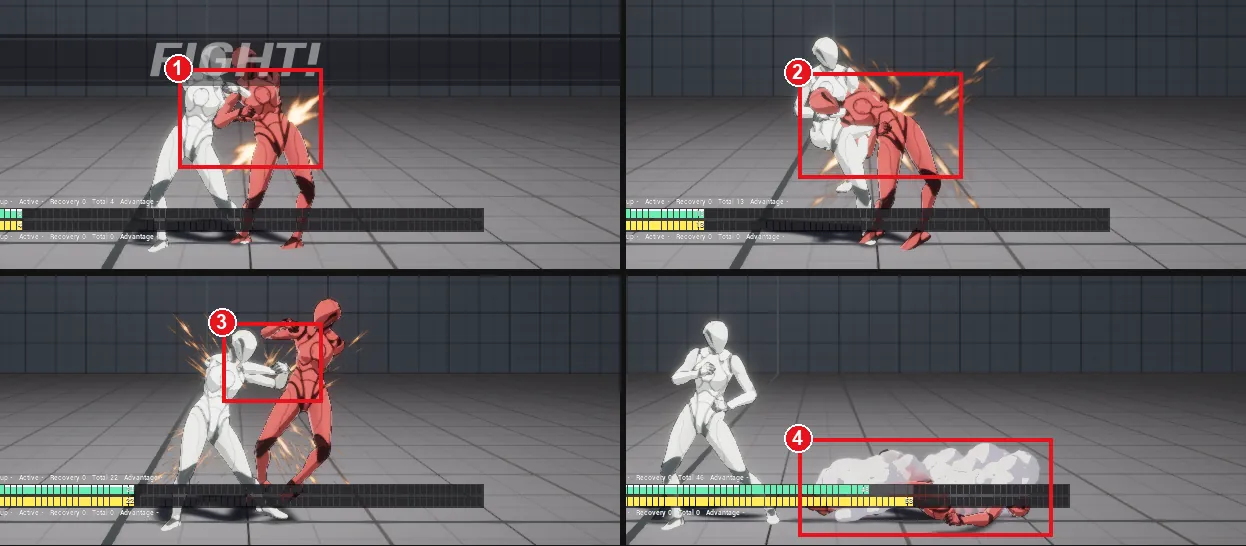
- Grabbed by the collar
- Knee in the stomach: the opponent folds
- Pushed away with both hands, just before the release
- Thrown forward: it lands in front of the thrower
A_Throw_Forward and A_Thrown_Forward were animated together: the held opponent at the hold offsets of each frame,
mirrored like in game, so the hands of the thrower stay on its collar and the knee lands in its stomach. Do the same for your
own throws: animate the two fighters in one scene, the opponent placed at the Hold Opponent offsets, then use these offsets in
the success action. At the release, end the opponent animation close to the first pose of its Thrown action (Hit_Air for
Quinn), so the switch to it is smooth.
Tune the offsets in the Fighter Editor: the preview opponent follows the hold events, and
the start and end points of a Hold Opponent can be dragged in the viewport. A fighter made before the held throw gets it with
RegenerateActions on Throw_Attempt and Throw_Success. The
AFT.Core.Simulation.HoldThrow and AFT.Visual.Throw tests check
held throws.
Limits
The simulation uses fixed capacities (rollback friendly, no allocation): per frame at most 8 hitboxes and 6 hurtboxes per entity, 8 hit definitions per action, 12 explicit cancel targets per window and 4 chained Go To per frame.
Custom frame events (Blueprint)
A new frame event can be made in Blueprint, without C++:
- Content Browser > Add > Blueprint Class, parent class AFT Frame Event Blueprint.
- Add the settings of the event as variables (integers, booleans, actions, gameplay tags,
AFT Fixedvalues...) and tick Instance Editable: each event placed on a timeline gets its own values. - Override the Execute function. Its Event input is the running event: plug it into the AFT Frame Event functions to read and change the fighter.
- In the Fighter Editor, right click a track > Blueprint Event, then pick your class in the Event details and set its variables.
The template has an example, /AFT/Data/FrameEvents/BP_AFT_FrameEvent_Heal (the Blueprint version of the C++ example below):
its Execute calls Add Health with its Health Per Frame variable (10 by default), so the fighter heals on every frame
of the event.
| Functions (AFT Frame Event category) | |
|---|---|
| Frames | Get Frame, Get Event Start Frame, Get Event End Frame, Get Frame In Event, Is First Frame, Is Last Frame |
| Situation | Is Projectile, Has Hit, Has Blocked, Is Airborne, Get Facing, Is Button Held, Get Position, Get Distance To Opponent |
| Health and meter | Get Health, Get Max Health, Add Health (between 1 and the max health: a frame event never knocks out), Get Meter, Add Meter |
| Movement | Get Velocity, Set Velocity, Add Velocity (cm per frame, X forward), Set Gravity Percent, Face Opponent |
| State and flow | Raise State Flags, Set Invulnerable, Open Cancel Window, Go To Action, Spawn Projectile, Play Cue |
| Random | Random Int, Random Chance (the simulation random) |
For the math, the AFT Fixed nodes are deterministic: Fixed From Int, Fixed From Raw, To Int (Fixed), + - * /,
Fixed * Int, Fixed Percent, Negate, Absolute, Min, Max, < > ==, Fixed Vector From Int and
Fixed Vector + Fixed Vector.
Optional overrides: Validate (errors shown when the action is saved), Get Editor Color, Get Editor Label and Is Instant (look of the event on the timeline).
Execute runs on every frame of the event, and again on every frame the simulation plays again (rollback, sync test): from the same state, it must give the same result.
- Integers and AFT Fixed values only. No Float math nodes: their result can differ between two machines and desync an online match. A float typed in a Make Fixed pin is fine (a constant).
- For random, Random Int and Random Chance only, never the Blueprint Random nodes.
- Execute is a const function: it can't change the variables of the event. Everything that changes lives in the simulation (health, velocity...).
- No world, actor, sound, widget, timer or delay: the event runs inside the simulation. To show something, Play Cue: the cue set plays the VFX, sound and camera shake, and its Effect Actor (a Blueprint actor) does anything else, once per event even when the frame is played again.
- A Blueprint event costs more than a C++ one: keep Execute short, and move an event used by every action of every fighter to C++.
Custom frame events (C++)
Frame events are FInstancedStructs: derive a USTRUCT from FAFTFrameEvent and it appears in the timeline right click menu
and in the Event details automatically.
#include "Data/AFTFrameEvents.h"
#include "Sim/AFTBattleSimulation.h"
#include "MyFrameEvents.generated.h"

/** Example: heals the owner while active. */
USTRUCT(BlueprintType, meta = (DisplayName = "Heal"))
struct FMyFrameEvent_Heal : public FAFTFrameEvent
{
	GENERATED_BODY()

	UPROPERTY(EditAnywhere, BlueprintReadWrite, Category = "AFT")
	int32 HealthPerFrame = 10;

	virtual void Execute(FAFTFrameEventContext& Context) const override
	{
		// Integer math only, no world access: the simulation must stay deterministic.
		// Context gives Sim, EntityId, Entity, OwnerFighter, FighterData, Action, Frame, EventStartFrame, EventEndFrame.
	}

#if WITH_EDITOR
	virtual FLinearColor GetEditorColor() const override { return FLinearColor(0.2f, 0.9f, 0.3f); }
#endif
};
Rules for Execute: integer / FAFTFixed math only, no float, no random other than the simulation RNG, no access to the world
or to actors. Return false from AffectsSimulation for presentation only events. See
Writing Deterministic Code.