Create a Fighter from Animations
The fastest way to get a playable character is the Fighter Wizard, a window of the editor: pick a skeletal mesh and its animations, check which animation each move gets, click Create Fighter. No code, no Python.
Open the wizard
- Tools > AFT > Fighter Wizard...
- In the Content Browser, right click a Skeletal Mesh > AFT > Create Fighter...: the mesh is filled in, and the fighter name
is the mesh name without its
SK_/SKM_prefix. - In the Content Browser, right click a folder > AFT > Create Fighter Here...: the folder is filled in.
One wizard window is open at a time.
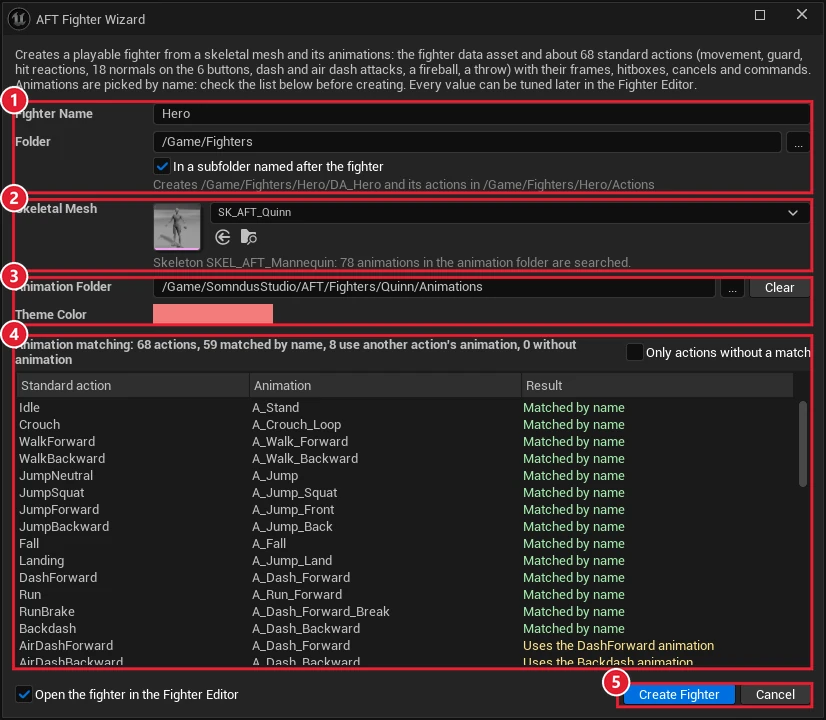
- Fighter Name (letters, digits and
_): the fighter isDA_<Name>, its actionsDA_<Name>_Idle,DA_<Name>_Normal_5A... Folder:/Game/Fightersby default, ... picks another one. With In a subfolder named after the fighter (on by default), everything goes to<Folder>/<Name>; the grey line shows the exact paths. - Skeletal Mesh: the line below gives its skeleton and the number of animations searched.
- Animation Folder (optional, Clear empties it): empty = every animation of the mesh skeleton. Theme Color: click the swatch to open the color picker.
- Animation matching: the animation each standard action will get (see below). The header counts the matches.
- Create Fighter (and Cancel)
Animation matching list
One row per standard action (68), plus the animation of the held opponent of Throw_Success. The Result column says what the
wizard found, before anything is created:
| Result | Meaning |
|---|---|
| Matched by name (green) | An animation name matches the action, see Animation matching. |
| Uses the X animation (yellow) | No match: the action takes the animation of another action (for example the air dash attacks use the dash animation). |
| No animation: reference pose (red) | Nothing found: the action is created with the reference pose. Give it an animation later in the Fighter Editor. |
| No animation needed (grey) | The projectile of the fireball. |
| ..., other skeleton! (red) | The animation belongs to another skeleton and will not play on this mesh. |
Hover a row to see the animation names searched for it. Only actions without a match hides the matched rows.
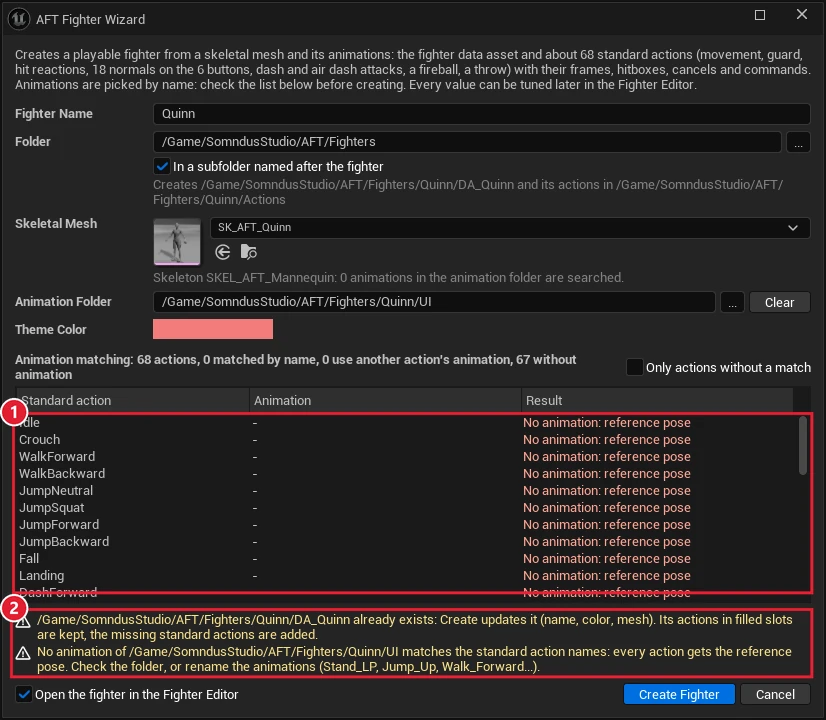
- A folder without animations: every action would get the reference pose (red rows)
- The messages: here two warnings, the fighter already exists and no animation matches
The messages under the list explain what is wrong:
- Red messages block Create Fighter: no name or an invalid one, a folder outside the content, no mesh, a mesh without skeleton.
- Yellow messages only warn: the fighter already exists (Create Fighter updates it, after a confirmation), no animation matched at all, actions without animation, animations of another skeleton.
Create
Create Fighter creates the fighter and its actions, saves the folder, selects the fighter in the Content Browser, opens it in
the Fighter Editor (untick Open the fighter in the Fighter Editor to skip it) and closes the window. A
notification and the LogAFTWizard lines of the Output Log sum up what was created (see Logs).
From a script
The wizard runs the functions of UAFTEditorLibrary (category AFT | Editor). They are Blueprint callable, so they also work from
Python and from Editor Utility Widgets: handy to batch-create a roster.
import unreal

mesh = unreal.EditorAssetLibrary.load_asset("/Game/Hero/Mesh/SK_Hero")
fighter = unreal.AFTEditorLibrary.create_fighter_from_animations(
    "Hero",                       # fighter name (asset DA_Hero, FighterId)
    "/Game/Fighters/Hero",        # folder of the fighter
    mesh,                         # skeletal mesh
    "/Game/Hero/Animations",      # folder searched for animations (recursive)
    unreal.LinearColor(1.0, 0.3, 0.2, 1.0))  # theme color
unreal.AFTEditorLibrary.save_all_under("/Game/Fighters/Hero")
Run it from the Output Log (switch the command line to Python), from Tools > Execute Python Script, or from an Editor
Utility Widget with the Create Fighter From Animations node. It refuses an empty or invalid fighter name (letters, digits and
_ only) or a folder outside the content, with an error in the log.
Like the wizard, it creates the fighter data asset, about 68 standard actions in <folder>/Actions (DA_Hero_Idle,
DA_Hero_Normal_5A...), fills the action slots and the commands, and adds two palettes. PreviewAnimationMatches(Mesh, AnimationFolder) returns the matching list of the wizard without creating anything.
What is generated
| Group | Actions |
|---|---|
| Neutral and movement | Idle, crouch, walk forward / backward, dash, run, run brake, backdash, jump squat, neutral / forward / backward jump, fall, landing, air dash forward / backward |
| Guard | Stand, crouch and air guard |
| Reactions | Light / medium / heavy stand hits, crouch hit, air hit, air recovery, launch, knockdown, wake up, thrown |
| Match | Intro, win pose, time over lose, KO |
| Tag team | Tag in, assist (the heavy normal) |
| Normals | 18 normals on the six attack buttons: Normal_5A to 5F (standing), 2A to 2F (crouching: 2C anti-air uppercut, 2F sweep), jA to jF (jumping), with hitboxes, hit definitions, counter hit state, whiff cue and gatlings (light -> medium -> heavy, punches and kicks alike) |
| Dash attacks | DashAttack_A to F, from the forward dash and the run (see below) |
| Air dash attacks | AirDashAttack_A to F, from both air dashes |
| Special | Special_Fireball (236C) spawning Projectile_Fireball |
| Throw | Throw_Attempt (AD = LP + LK, throw box) and Throw_Success, a held throw: knee in the stomach, thrown forward |
Every value (frames, boxes, damage) is a starting point: open the fighter in the Fighter Editor to tune
them. The hitboxes of the normals are measured on the striking hand or foot of the template animations (Quinn): 5B is a rising
punch, so its hitbox is above the head (anti-air). With other animations, move them with the gizmo of the Fighter Editor or with
SetActionHitboxes. The other slots (turn, stand to crouch, wall bounce, wall splat, ground bounce, crumple...) are optional and fall back to close actions until
you add them (see action slots).
Animation matching
Animations are matched by name tokens, so most animation packs work without renaming: Walk + Forward (or Mv / Move +
Forward), Jump + Up, Jump + Start / Squat, Dash + Backward, Crouch + Guard, Crouch + Dmg, Stand + LP,
Crouch + HK, Jump + MP, Throw + Attempt... Excluded tokens avoid wrong matches (an idle never picks a Guard or Hit
animation).
| Action | Animation names | Without a match |
|---|---|---|
Run (16 frames, loops at the DashForwardSpeed stat) | Run + Forward, or Run (never Brake, Break or Stop) | The dash animation |
RunBrake (20 frames, speed 5, then 2.5 at frame 4, 0 at frame 8) | Run + Brake, Run + Stop, Dash + Break or Dash + Brake | The idle animation |
Normals (5A... jF) | Stand (or STD) / Crouch / Jump (or Air) + the button: LP, MP, HP, LK, MK, HK | The idle, crouch or neutral jump animation |
DashAttack_A to F | Dash + button, or Run + button (A_Dash_LP... A_Dash_HK) | The matching standing normal (the slide: 2E) |
AirDashAttack_A to F | AirDash + button, or Air + Dash + button (A_AirDash_LP...) | The matching jumping normal |
Throw_Attempt | Start + Throw, or Throw + Attempt | The 5A animation |
Throw_Success | Throw + Forward, or Throw (never Start) | The 5C animation |
Held opponent (OpponentAnimation of Throw_Success) | Thrown + Forward, or Thrown | None |
- With an empty
AnimationFolder, every animation of the mesh skeleton is a candidate. - When no animation matches, the action is still created with a fallback pose: give it an animation later with an Animation event on its Animation track.
- The animation of each action is written as one Animation event over the whole action, on the Animation track.
- When an animation is found,
TotalFramesfollows its length at 60 fps (normals are at least startup + active + 6 frames long, the throw success at least 30). The fireball, its projectile and the throw attempt use fixed lengths.
Dash and air dash attacks
Each attack button has a version out of a dash. The wizard adds them as commands with
FromActionSlots, so the same button gives the normal from neutral and the dash attack
during the dash.
| Button | Dash attack (forward dash or run) | Air dash attack (air dash forward or backward) |
|---|---|---|
| A (LP) | Jab | Jab |
| B (MP) | Rising palm strike | Backfist |
| C (HP) | Lunging straight, hard knockdown | Hammer, hard knockdown |
| D (LK) | Front kick | Knee |
| E (MK) | Slide: low, soft knockdown | Side kick |
| F (HK) | Hop kick: overhead | Dive kick: dives forward and down until the landing |
- The dash attacks keep part of the dash or run momentum (velocity events that slow down over the move).
- The air dash attacks keep the air dash momentum, with gravity back; the dive kick turns gravity off and dives at a fixed angle.
- Gatlings: the light dash attacks chain into the medium and heavy normals,
DashAttack_Binto the heavy ones; in the air, the light and medium air dash attacks chain like the jumping normals.
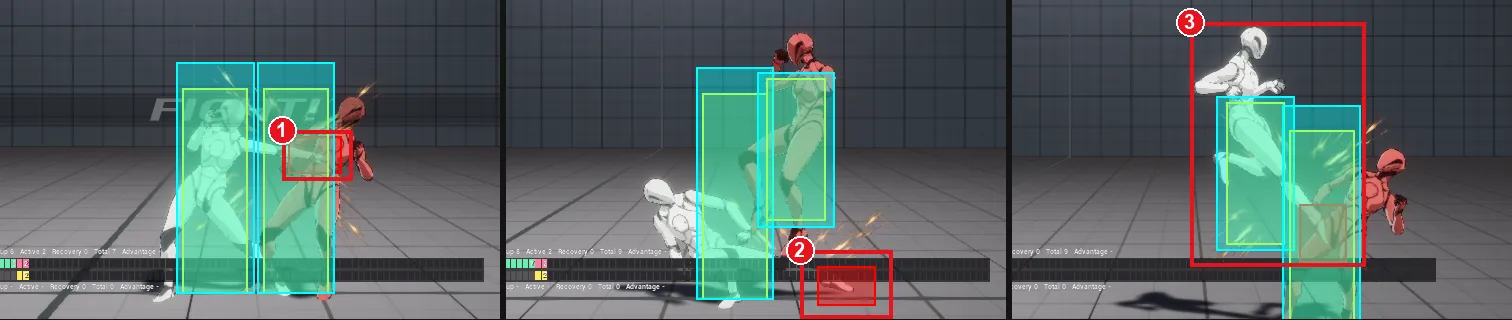
- Dash LP: the hitbox (red) at the end of the arm
- The slide (MK): a low hitbox along the ground
- The dive kick (HK) out of an air dash
In-place animations
AFT animations have no root motion: the simulation moves the fighter (velocity events, gravity, push), and the animation only poses the body on that position. The fighter anim instance cancels the horizontal translation of the root bone, but keeps its height. So:
- Export locomotion, dashes and jumps in place: walking forward or jumping must not move the root bone.
- In a jump, keep the root at rest: the simulation already gives the height. A root that rises lifts the body out of its hurtbox, and the hits no longer match the picture.
- When the root of a baked animation only rotates the body (flips, the lean of an air dash), move that rotation to the pelvis in your DCC tool before export.
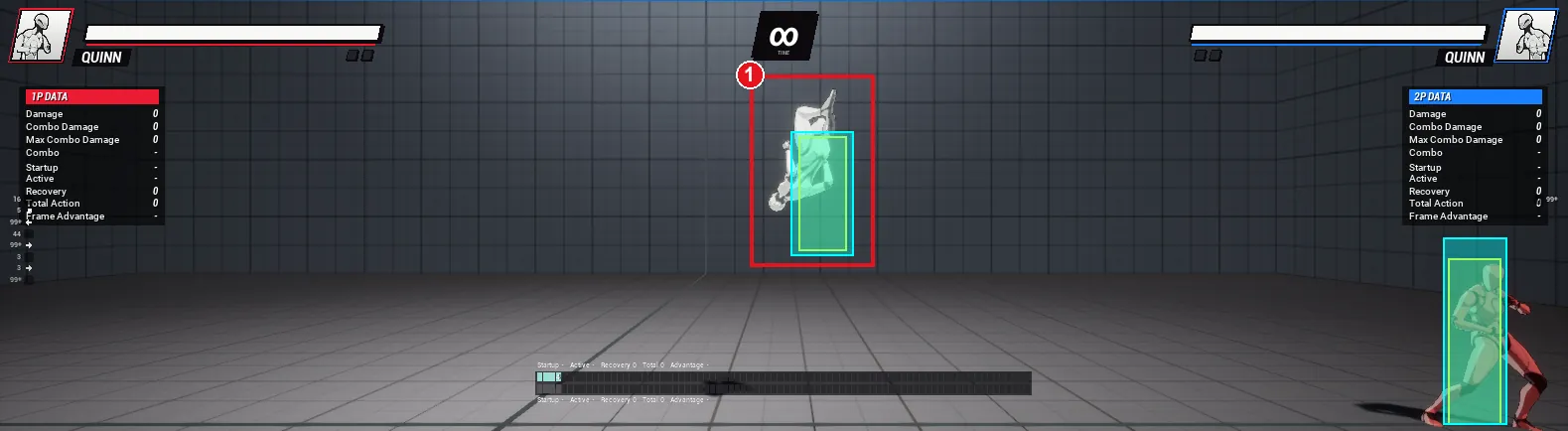
- A forward jump: the body stays on its hurtbox, because the animation is in place and only the simulation moves the fighter
The AFT.Visual.MovementScreenshots test checks this (see Debugging and Tests).
Other wizard functions
| Function | Result |
|---|---|
PreviewAnimationMatches(Mesh, AnimationFolder) | For each standard action, the animation it would get (Matched, Fallback on another action, or None), the names searched and whether the animation is of another skeleton. Creates nothing: it is the matching list of the wizard. |
GenerateCommonActions(Fighter, AnimationFolder) | Creates the standard actions whose slot is empty and fills the slots and commands, also wiring the gatlings and cancels of the existing standard actions. Same as Generate common actions in the Fighter Editor. Returns the number of actions created. |
GenerateMissingActions(Fighter, AnimationFolder) | Same, but the existing actions are kept as they are (timeline, hits, commands): only the standard actions the fighter does not have are created. An existing DA_<Fighter>_<Name> asset is reused and slotted if its slot is empty. The existing normals only gain the gatlings into the new normals. Use it after a template update that adds standard actions, such as the run, the six button normals or the dash attacks. Returns the number of actions created. |
RegenerateActions(Fighter, AnimationFolder, ActionNames) | Rebuilds these standard actions from the template, by name ("Throw_Attempt", "Throw_Success"...): their timeline and hits are replaced, their commands kept. The other actions are handled like GenerateMissingActions. Use it to get a new version of a standard move, such as the held throw. Returns the number of actions created or rebuilt. |
SetActionHitboxes(Action, X, Y, Width, Height) | Moves every hitbox of the action to this box (center X forward / Y up from the feet, width, height, in cm), for example to fit the hitboxes on the striking limb of your animation. Timing, hits and cancels are kept. Returns the number of hitboxes changed. |
CreateActionForFighter(Fighter, Name, Category, Animation) | One new action in <fighter folder>/Actions, added to the fighter, with the animation as one Animation event over the whole action. |
CreateFighterSequence(Fighter, bVictory, DurationFrames) | Intro / victory Level Sequence, see Cinematics. |
SaveAllUnder(PackagePath) | Saves every dirty package of a folder. |
The sample fighter Quinn was built with these functions: call them from a script to batch-create a roster. See Python and Editor Scripting.
From the Content Browser
You can also start from an empty fighter: Content Browser > right click > AFT > Fighter, set its Mesh, open it and click
Generate common actions in the Actions tab. Generate missing actions, next to it, only creates the standard actions the
fighter does not have and keeps the existing ones as they are. Both show a notification with the number of actions created.