CPU Editor
Double-click an AFT CPU Profile to open the AFT CPU Editor. It shows the tactics of the profile as decks of cards, with the frame data of each move, and plays headless matches to show what the CPU does with them. See CPU Opponents for the concepts.
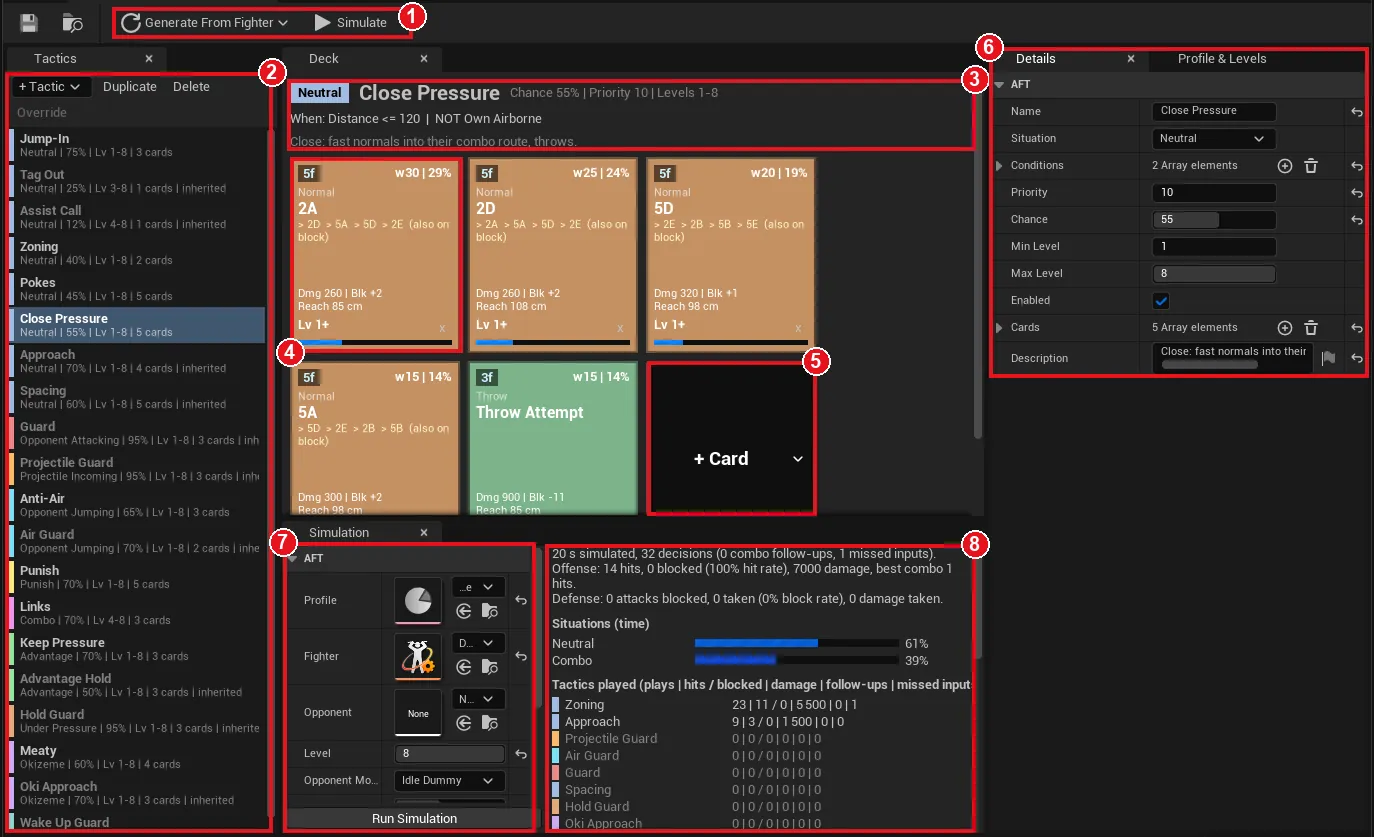
- Toolbar: Generate From Fighter (menu: Complete, Common Only, Fighter Moves Only) and Simulate
- Tactics panel: + Tactic, Duplicate, Delete, Override, and the tactics colored by situation (inherited ones dimmed)
- Header of the selected tactic: situation, name, chance, priority, levels, conditions ("When") and description
- A card: startup, weight and share of the draw, category, name, combo route, damage, on block, reach, minimum level
- + Card: the fighter's actions by category, plus the movement and defense cards
- Details of the selected tactic or card, and the Profile & Levels tab
- Simulation settings and Run Simulation
- Simulation results: offense and defense summary, time per situation, tactics played
Every change can be undone (Ctrl+Z).
Create the CPU of a fighter
- In the fighter's folder, create an AFT CPU Profile (Content Browser > Add > AFT Fighting), for example
DA_Hero_Cpu. - Open it. In Profile & Levels, set
ParenttoDA_AFT_CpuCommonandPreview Fighterto the fighter, and turnOverride Levelsoff to share the levels of the common profile. - Click Generate From Fighter > Fighter Moves Only: pokes, zoning, close pressure, anti-airs, punishes, combos, pressure, meaty and jump-ins with the fighter's moves.
- Review the decks: weights, key cards (the signature plays of the fighter), minimum levels, combo routes.
- Simulate against the dummies and against another CPU, at a low and a high level.
- Assign the profile to the fighter: Fighter Data > Simulation | CPU > CPU Profile.
The template profiles were made the same way. DA_AFT_CpuCommon is generated from the first fighter
with Common Only and holds the default levels. DA_Quinn_Cpu is its child, generated with Fighter Moves Only, with
Override Levels off so it uses the parent's levels. See Template profiles.
Generate tactics from a fighter
Generate From Fighter reads the move list of the preview fighter: frame data, reach, hitbox height, projectiles, throws, invulnerability and cancel windows. Its three modes are:
| Mode | Tactics |
|---|---|
| Complete | Movement, defense and the fighter moves. |
| Common Only | Movement, defense, wake up and tag team, without fighter moves: a parent profile shared by the roster (like DA_AFT_CpuCommon). |
| Fighter Moves Only | Pokes, zoning, anti-airs, punishes, combos: a child of a common profile (like DA_Quinn_Cpu). |
- The combo routes come from the cancel windows of the actions (for example
2A > 2D > 5A > 5D > 2E). - Generated special cards start at level 3, supers at level 5.
- A Reversal tactic (Waking Up, level 5 and up) is generated when the fighter has a strike invulnerable move.
- Generating again replaces the tactics of the generated names and keeps the others. Rename a tactic to protect your changes.
The same tactics are generated at runtime for a fighter without any profile.
Tactics panel
The list shows every tactic of the profile with its situation, chance, levels and number of cards. The color is the
situation's color. Inherited tactics (from the Parent) are dimmed and read-only.
| Button | Effect |
|---|---|
| + Tactic | Adds a tactic for a situation. |
| Duplicate | Copies the selected tactic. |
| Delete | Removes the selected tactic. |
| Override | Copies the selected inherited tactic into this profile to change it. Same name: it replaces the parent one. |
Deck panel
The center panel shows the selected tactic: a header with its situation, name, chance, priority, levels, conditions and description, then one card per play.
| On the card | Meaning |
|---|---|
| Top left | Startup frames (the cost of the move). |
| Top right | Weight and share of the draw in this tactic (w30 and 29% on the image). Key cards count double from level 4. |
| Middle | Category (Normal, Special, Throw...), name, combo route (> 2D > 5A > 5D, "also on block" with Follow Up On Block). |
| Bottom | Damage, advantage on block, reach. |
| Footer | Lowest level (Lv 3+), KEY for a key card, x to remove the card, and a bar with the share of the draw. |
Click a card to edit it in the Details tab. + Card lists the fighter's actions by category (Normals, Command Normals, Specials, Supers, Throws) and the Movement / Defense cards (block, walk, dash, jump, crouch, wait, tag, assist). Set a Preview Fighter to see its moves there.
Details and Profile & Levels
- Details: the selected tactic or card (read-only for an inherited tactic). Fields that do not apply to the card type are greyed out.
- Profile & Levels:
Parent,Brain,Override Levels, the 8Levels,Preview Fighter,Preview OpponentandDesigner Notes. See Levels.
Simulation
Simulate (toolbar) or Run Simulation (panel) plays headless matches of the profile with training rules (no KO, health refills). Nothing is rendered: a minute of fight takes a moment.
| Setting | Description |
|---|---|
Profile | Profile played by the CPU (empty: the fighter's CPU profile). |
Fighter | Fighter of the CPU. |
Opponent | Its opponent (empty: the same fighter). |
Level | Level of the CPU, 1 to 8. |
Opponent Mode | Idle Dummy (stands still: offense, combos, zoning), Guarding Dummy (holds down-back: pressure, mix-ups, throws), Aggressive Dummy (walks in, presses buttons, jumps sometimes: defense, anti-airs, punishes) or CPU (another CPU with its own fighter profile). |
Opponent Level | Level of a CPU opponent. |
Seconds | Simulated seconds per run. |
Runs | Runs with different seeds, results summed. |
Seed | First seed. The same settings always give the same result. |
The results show:
- the offense (hits, blocked attacks, hit rate, damage, best combo) and defense (attacks blocked, hits and damage taken, block rate) summary, with the decisions, combo follow-ups and missed inputs;
- the time spent in each situation;
- the tactics played: plays, hits / blocked, damage, follow-ups, missed inputs for each tactic;
- the last decisions: run, time, situation, tactic and card.
A tactic that is never played is either never in its situation, filtered by its conditions, or has no card in range: change the opponent mode to reach its situation.
From scripts
The simulation is a Blueprint callable function, UAFTCpuSimulator::Simulate, for balancing scripts and tests:
import unreal

settings = unreal.AFTCpuSimulationSettings()
settings.set_editor_property("profile", unreal.EditorAssetLibrary.load_asset("/Game/SomndusStudio/AFT/Fighters/Quinn/DA_Quinn_Cpu"))
settings.set_editor_property("fighter", unreal.EditorAssetLibrary.load_asset("/Game/SomndusStudio/AFT/Fighters/Quinn/DA_Quinn"))
settings.set_editor_property("opponent_mode", unreal.AFTCpuSimOpponent.GUARDING_DUMMY)
for level in (1, 4, 8):
    settings.set_editor_property("level", level)
    result = unreal.AFTCpuSimulator.simulate(settings)
    print(level, result.get_editor_property("hits_landed"), result.get_editor_property("damage_dealt"),
          result.get_editor_property("best_combo"))
UAFTCpuProfile::GenerateFromFighter(Fighter, Mode) is Blueprint callable too (generate_from_fighter in Python).