UI Overview
The whole AFT interface (menus, battle HUD, training HUD, pause, results, dialogs, settings, loading screen) is built on CommonUI and is console ready: gamepad first, several players on one screen, platform button icons, system alerts. The mouse works too. Its logic is written in C++: every screen builds its built-in look in code when it has no designer tree, so the template works without any widget asset. To make your own UI, replace the screens with your widgets: see Custom UI.
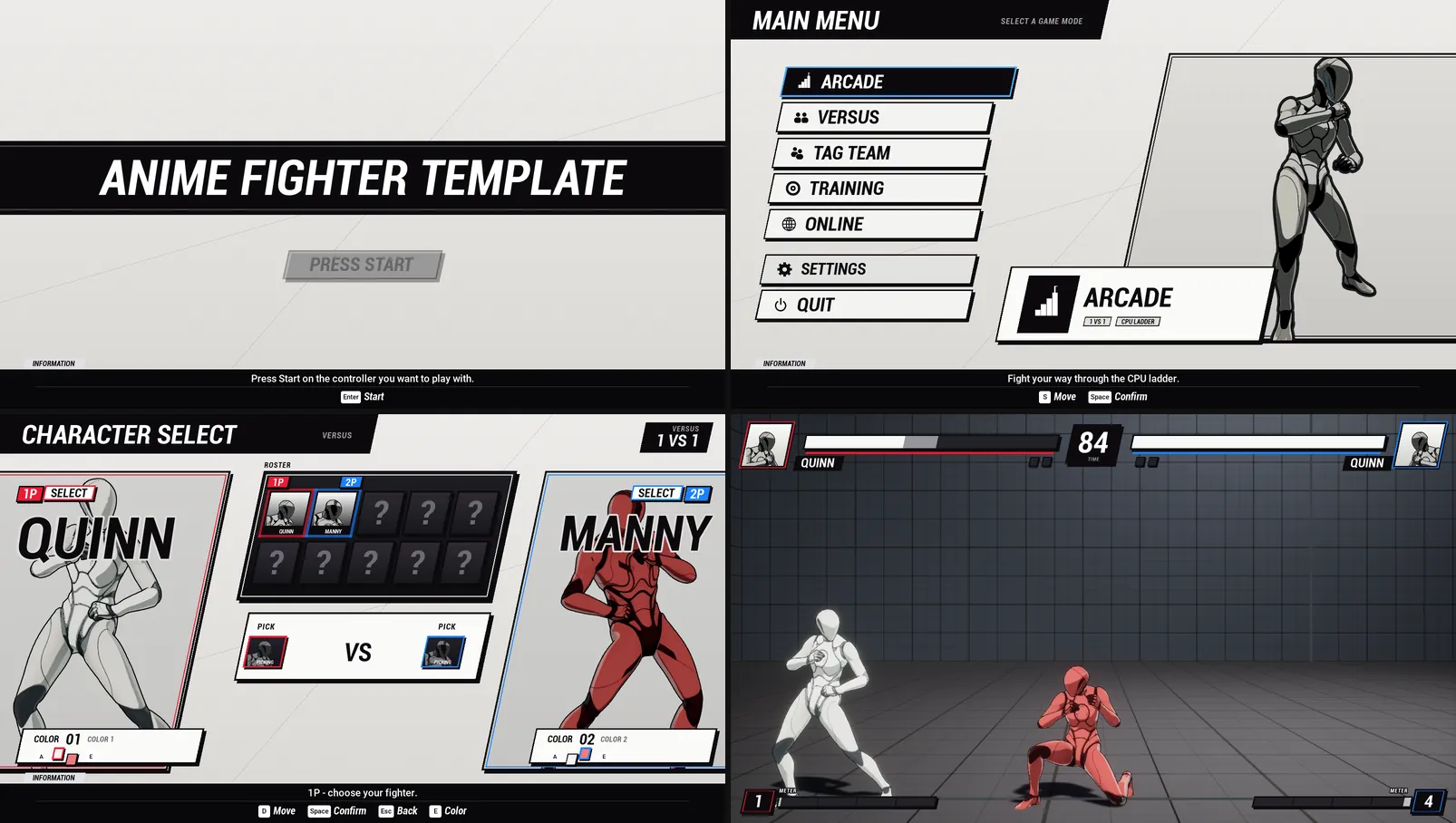
The UI Policy
The UI policy (UAFTUIPolicy, /AFT/UI/DA_AFT_UIPolicy, set in Project Settings > AFT Game > UI > UI Policy) says which
widget is used for every screen. The built-in screens have one fixed look (sober black and white, slanted ink framed panels, bold
condensed italic type, color only for 1P / 2P / CPU) and no settings: your UI is your own widgets, set here.
| Property | Description |
|---|---|
LayoutClass | Primary layout widget (default UAFTPrimaryLayout). |
Screens | Widget class per screen (see below). Screens that are not set use the built-in C++ screen. |
ControllerSilhouettes | The controller silhouette of each device type (side select, lobby, controller disconnected, button layout). Default: /AFT/UI/DA_AFT_ControllerSilhouettes. |
NavigateSound, ConfirmSound, BackSound, ErrorSound, NotificationSound | UI sounds of every AFT screen (empty in the template). |
Settings | Settings collection: tabs and rows of the settings screen. Template: /AFT/UI/Settings/DA_AFT_Settings. None: the Settings entry becomes Button Layout. |
NotificationDuration | Default duration of the notifications (3.5 s). |
bControllerDisconnectAlert | Show the controller disconnected alert (console certification). |
bLoadingScreenOnTravel | Show the loading screen before every map travel of the match flow. |
Main classes
| Class | Role |
|---|---|
UAFTUISubsystem | Game instance subsystem. Creates the primary layout and drives the navigation between the screens (ShowFrontEnd, ShowMainMenu, OpenModeFlow, ShowMatchOptions, ShowCharacterSelect, ShowOnlineLobby, ShowBattleHUD, TogglePauseMenu, ShowResultScreen, ShowSettings, ShowButtonLayout, PushScreen(Layer, Class)) and the feedback (below). GetLayout returns the primary layout of the world and creates it on the first call; FindLayout never creates it (use it in code that runs while the world closes, such as On Deactivated). |
UAFTPrimaryLayout | Root widget: one CommonUI activatable stack per layer, the notifications and the information bar. |
UAFTActivatableScreen | Base of every AFT screen (a UCommonActivatableWidget): menu actions of every device, mouse, Back, UI sounds of the policy, information bar, intro animations. |
UAFTMatchSubsystem | Data of the menus flow: roster, stages, modes, match options, the match being prepared, results, rematch, arcade progress. |
Layers
UAFTPrimaryLayout stacks one UCommonActivatableWidgetStack per layer (EAFTUILayer), bottom to top:
| Layer | Content |
|---|---|
Game | Battle HUD, training HUD (hidden while the result screen is shown) |
GameMenu | Pause, results |
Menu | Front end screens, settings, button layout |
Modal | Match options, confirmations, alerts, errors |
SystemAlert | Loading screen, controller disconnected |
Between Modal and SystemAlert, the layout shows the notifications (toasts, top right) and the information bar (bottom):
the message of the top screen (GetInfoMessage, for example the description of the focused entry) and its button hints
(GetInputHints), each with the icon of the key bound to the action for the player's current device. The bar is hidden during the
battle. The hints are buttons: a click sends their action to the screen. Only the top screen takes the menu actions (a modal
over a menu, the settings over the pause).
Screens
Policy entry (EAFTUIScreen) | Default class | Default look |
|---|---|---|
Title | UAFTTitleScreen | Title band with the game name, pulsing PRESS START |
MainMenu | UAFTMainMenuScreen | Cascading slanted entries with mode pictograms (one per game mode), SETTINGS, QUIT, preview panel with the mode card and a fighter render |
SideSelect | UAFTSideSelectScreen | 1P side / controllers / 2P side lanes: device cards (controller silhouette) move left / right; CPU badge and level on a side without device; match options with Tab |
MatchOptions | UAFTMatchOptionsScreen | Modal: rounds to win, round time, fighter intros, CPU level (team size, assists and shared meter in tag modes), reset to the mode defaults |
CharacterSelect | UAFTCharacterSelectScreen | Side panels (the fighter in real time 3D or its Full Art, big name, SELECT / READY tags, color picker), roster board with the 1P / 2P cursors, picks (tag team slots) |
StageSelect | UAFTStageSelectScreen | Stage preview, stage list with RANDOM, matchup |
OnlineLobby | UAFTOnlineLobbyScreen | Fighter card, host / find (plus development entries outside Shipping), lobby list with ping bars |
BattleHUD | UAFTBattleHUD | Slanted health bars with drain, portraits and names, round pips, timer, meter gauges, combo counter, round banners |
TrainingHUD | UAFTTrainingHUD | Battle HUD + frame meter, input logs, damage / frame data panels |
PauseMenu | UAFTPauseMenu | Left panel over the battle (training options in training), SETTINGS |
Result | UAFTResultScreen | Winner panel, score card (fighters, round pips, time), rematch / character select / main menu; in arcade the ladder, next fight / continue, ARCADE CLEAR and GAME OVER |
Confirmation, Alert | UAFTConfirmDialog | Card with a title band (error color for errors), horizontal choices |
Loading | UAFTLoadingScreen | NOW LOADING band |
ControllerDisconnected | UAFTControllerDisconnectedScreen | System alert with the silhouette of the lost controller |
Settings | UAFTSettingsScreen | Tabs, sections and rows of the policy Settings collection: rotators, ON / OFF switches, percent bars, buttons, description panel |
ButtonLayout | UAFTButtonLayoutScreen | Fight button layout of the gamepad and of the two keyboard halves |
Each screen is described in Screens.
Mouse
Menus are driven natively with the mouse, like with a gamepad: hovering a row selects it, a click activates it (arrows, switches, bars, tabs and buttons too), the wheel moves the selection, the right button goes back, and the button hints of the information bar are clickable. The per player cursors (side select, roster of the character select, color pickers of player 2) stay keyboard / gamepad only. The battle HUD captures and hides the cursor.
Animations
The default looks are animated in code (no UMG animation asset needed): panels slide in, rows cascade, stamps pop. Timings are short
and crisp, fighting game style. Blueprint screens with a designer tree use UMG
animations as usual (PlayWidgetTween is also Blueprint callable).
Feedback
From C++ or Blueprint (UAFTUISubsystem, category AFT | UI | Feedback):
| Function | Description |
|---|---|
| Show Confirmation(Title, Message, OnResult) | Yes / No dialog. |
| Show Alert(Title, Message, bError, OnClosed) | Message + OK, in the error colors when bError. |
PushNotification(Message, Type, Duration) | Toast: Info, Success, Warning or Error. |
ShowLoading(Message) / HideLoading() | Loading screen. Also shown automatically before every map travel of the match flow (policy bLoadingScreenOnTravel). |
Controller disconnected (policy bControllerDisconnectAlert): when the device of a player slot disconnects, offline battles
are paused and a system alert asks the player to reconnect it. It closes when the controller is back, or when the player confirms
on another free controller, which then becomes the player's device. Console certification requires this behavior.
Menu input, per device
AFT reads the devices itself (UAFTInputSubsystem, an input pre-processor that never consumes the keys, so CommonUI keeps
working). Each device produces menu actions: Up, Down, Left, Right, Confirm, Back, Start, Select, TabLeft,
TabRight, sent to the top screen with the player slot and the device that pressed them.
- The title screen assigns the device that presses Start to player 1.
- The side select screen assigns the other devices to player slots (P1 / CPU / P2 lanes, like modern fighters).
- On the character select, each player moves its own cursor at the same time.
- By default only assigned players drive a screen (
bAssignedPlayersOnly), and Back from player 1 closes it (bCloseOnBack).
The bindings of the menu actions are part of the input bindings.