Play the Template
Training room
The editor opens on Map_AFT_Training (/Game/SomndusStudio/AFT/Maps). Press Play (Alt + P): a training match starts
right away, Quinn (player 1) against a second Quinn in the other color (training dummy), with the frame meter, the input logs, the damage panels
and the hitboxes.
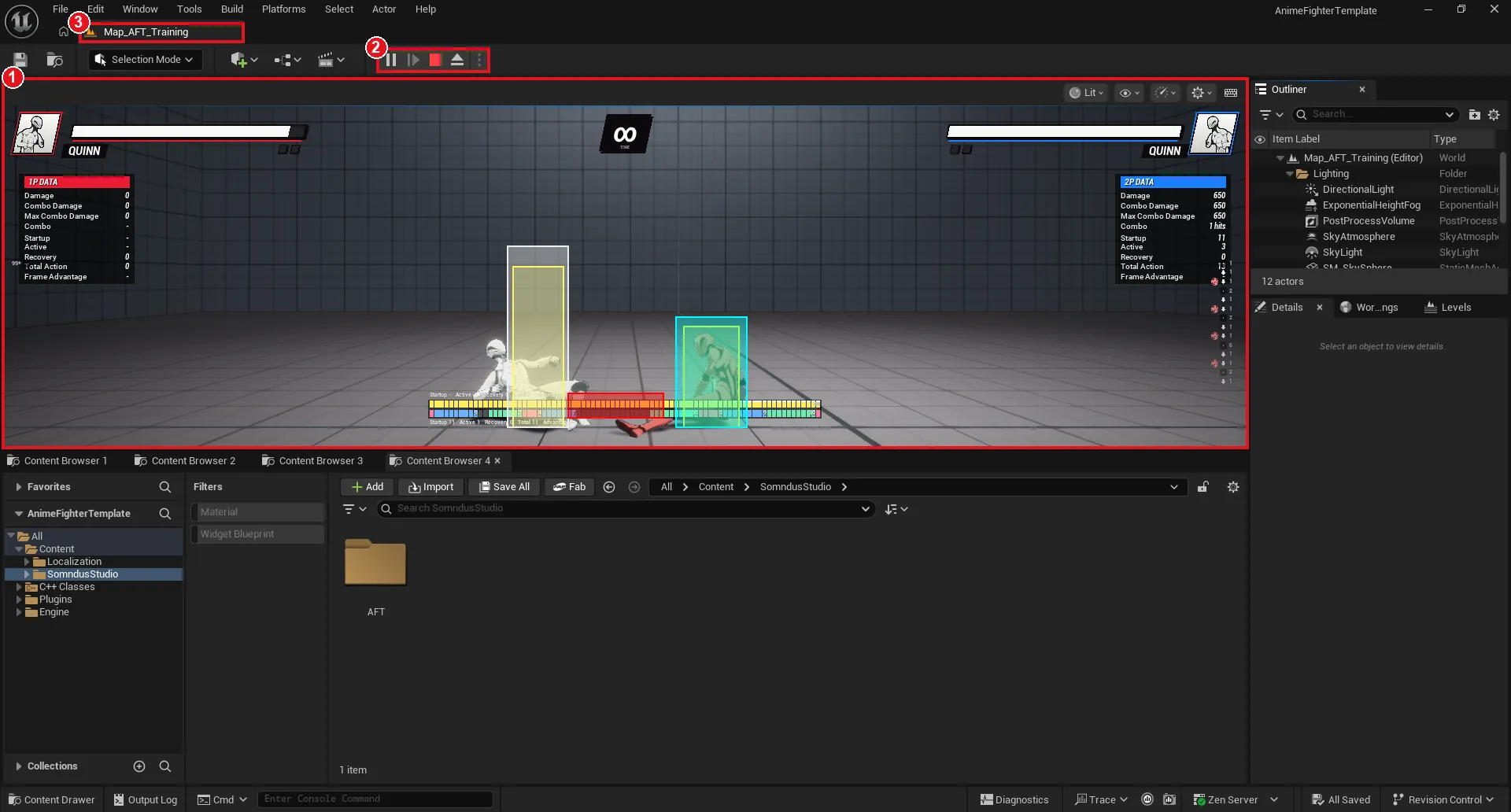
- The game viewport (Play In Editor)
- Play / stop controls
- The training room map
Map_AFT_Training
The match is started by the AFT Match Tester actor placed in the map (preset Training). Change its settings to play another configuration, see Match Tester.
Like every Play In Editor session, click in the game viewport first so that it receives the keyboard.
Default controls
The keyboard is split in two virtual pads so that two players can share it. Every gamepad is a separate device.
| Left keyboard | Right keyboard | Gamepad | |
|---|---|---|---|
| Move | ZQSD (template, AZERTY) / WASD (QWERTY) | Arrows | D-pad / left stick |
| Punches A B C (LP MP HP) | U I O | Num 4, Num 5, Num 6 | Square, Triangle, R1 |
| Kicks D E F (LK MK HK) | J K L | Num 1, Num 2, Num 3 | Cross, Circle, R2 |
| Tag G, Assist H | P M | Num 7, Num 8 | L1, L2 |
| Menu confirm / back | Space or U / Escape or I | Num 4 / Num 5 | Cross / Circle |
| Start (pause, training menu) | Enter | Num 0 | Options |
| Select | Tab | Num . | Share / View |
| Menu tab left / right | A / E (AZERTY), Q / E (QWERTY) | L1 / R1 |
The template project uses the AZERTY layout (Project Settings > AFT Game > Input > Keyboard Layout). Switch it to QWERTY for WASD. See Input and Controls to change every binding.
Movement follows the usual anime fighter conventions: forward forward (66) dashes, and holding forward after the dash
runs until you release it; back back (44) backdashes; up jumps, and 66 / 44 in the air air dashes. See
The default graph.
Quinn has a normal on each of the six attack buttons, standing, crouching and in the air. A button during the dash or the run gives a dash attack (MK: a slide), and during an air dash an air dash attack (HK: a dive kick). LP + LK throws: Quinn grabs the opponent by the collar, knees it in the stomach and throws it forward. See Commands and Cancels.
Training menu
Press Start during a training match to open the training menu:
- Reset position (center) / Reset position (corner)
- Dummy: stand / Dummy: CPU
- Hitboxes, Frame meter, Input log, Damage / frame data: ON / OFF
Everything is described in Training Mode.
Menus
To play the complete flow (title screen, main menu, side select, character select, stage select, battle, results), open
Map_AFT_FrontEnd and press Play, or launch the game in Standalone mode: Map_AFT_FrontEnd is the game default map.
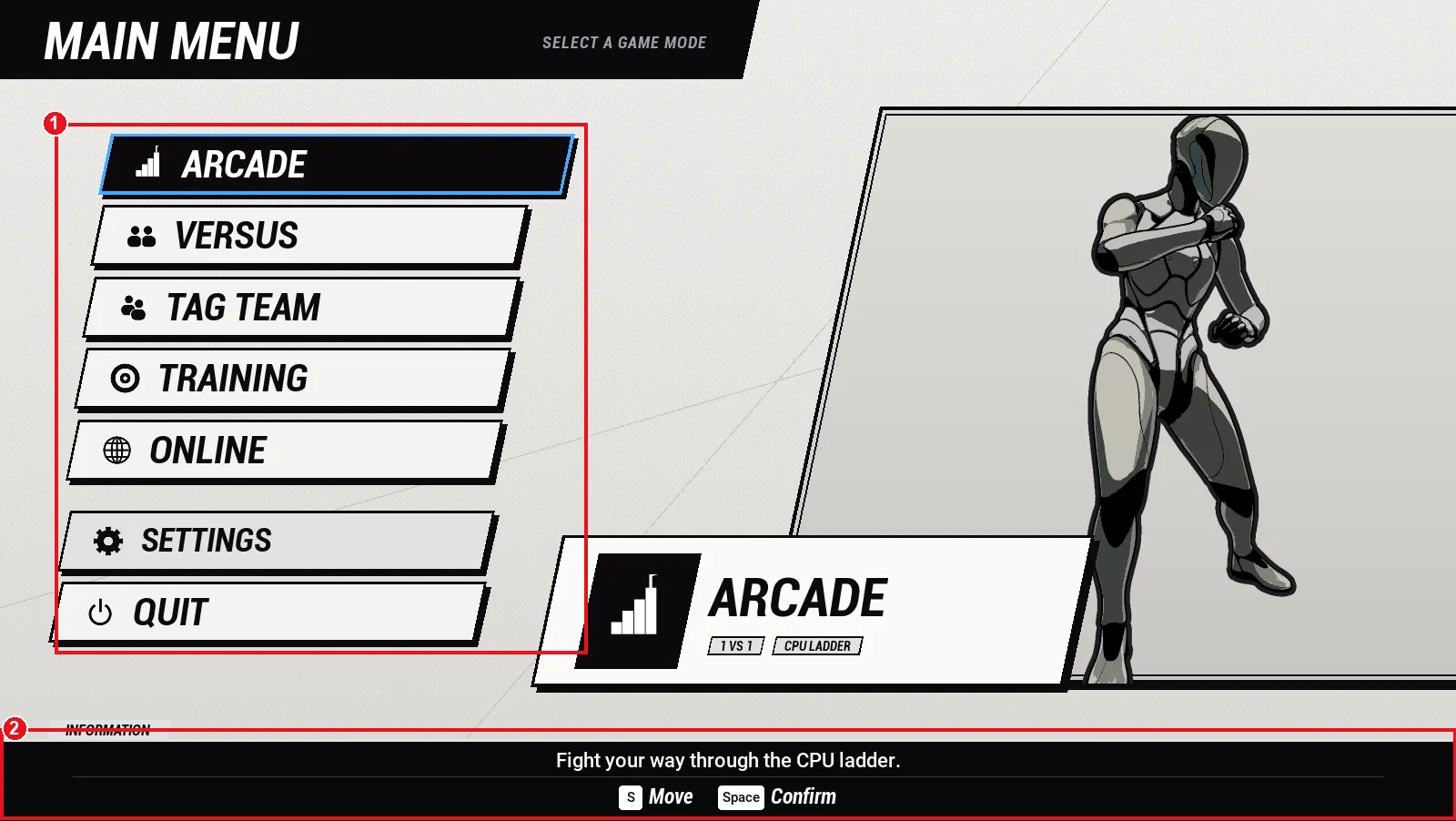
- The game modes (AFT Game Mode assets), Settings and Quit
- Information bar: description of the focused entry and button hints
The main menu lists the game modes of the project: Arcade, Versus, Tag Team, Training and Online. See Game Modes. In Arcade, only player 1 picks a fighter, then fights the three CPU opponents of its ladder (Quinn and Manny each have their own, see Arcade).