Settings
We are going to see how the settings system works.
In general, settings must be added on the C++ side, for example in GameSettingRegistry_Video.cpp:
//----------------------------------------------------------------------------------
{
    UGameSettingValueDiscreteDynamic_Enum* Setting = NewObject<UGameSettingValueDiscreteDynamic_Enum>();
    Setting->SetDevName(TEXT("WindowMode"));
    Setting->SetDisplayName(LOCTEXT("Setting_Window_Mode_Name", "Window Mode"));
    Setting->SetDescriptionRichText(LOCTEXT("Setting_Window_Mode_Desc", "In Windowed mode you can interact with other windows more easily, and drag the edges of the window to set the size. In Windowed Fullscreen mode you can easily switch between applications. In Fullscreen mode you cannot interact with other windows as easily, but the game will run slightly faster."));

    Setting->SetDynamicGetter(GET_LOCAL_SETTINGS_FUNCTION_PATH(GetFullscreenMode));
    Setting->SetDynamicSetter(GET_LOCAL_SETTINGS_FUNCTION_PATH(SetFullscreenMode));
    Setting->AddEnumOption(EWindowMode::Fullscreen, LOCTEXT("Setting_Window_Mode_Fullscreen", "Fullscreen"));
    Setting->AddEnumOption(EWindowMode::WindowedFullscreen, LOCTEXT("Setting_Window_Mode_Windowed_Fullscreen", "Windowed Fullscreen"));
    Setting->AddEnumOption(EWindowMode::Windowed, LOCTEXT("Setting_Window_Mode_Windowed", "Windowed"));

    Setting->AddEditCondition(FWhenPlatformHasTrait::KillIfMissing(TAG_Platform_Trait_SupportsWindowedMode, TEXT("Platform does not support window mode")));

    WindowModeSetting = Setting;

    Display->AddSetting(Setting);
}
As you can see, Setting->AddEditCondition lets you control whether a setting is allowed depending on the platform.
This approach adds settings as data only, with no visual UI attached.
The UI is created in Blueprints, where widgets are selected/interpreted through a configuration based on the setting data type.
For example, to bind visual fields that inherit from UGameSettingValueDiscrete (like enum-based choices), we use the GameSettingVisualData asset on the Blueprint side:
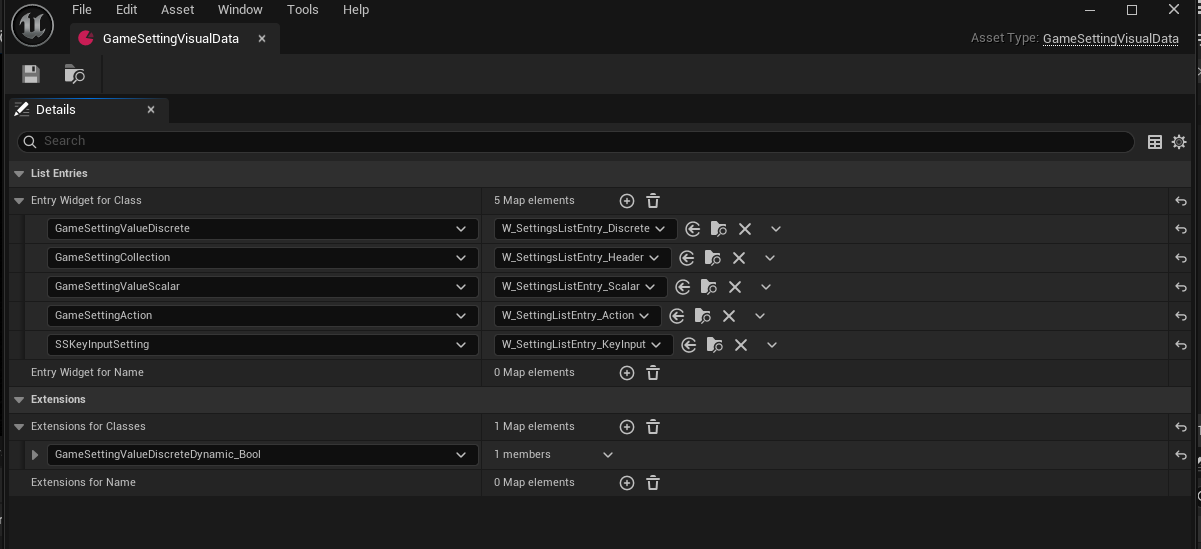
This asset is what links the settings data to the UI representation.